Free Website for Small Business: How to Create One in Under a Minute (2026)
A step-by-step guide to getting a free website for your small business: what it needs, how to build it in under a minute, costs, Google tips and mistakes to avoid.
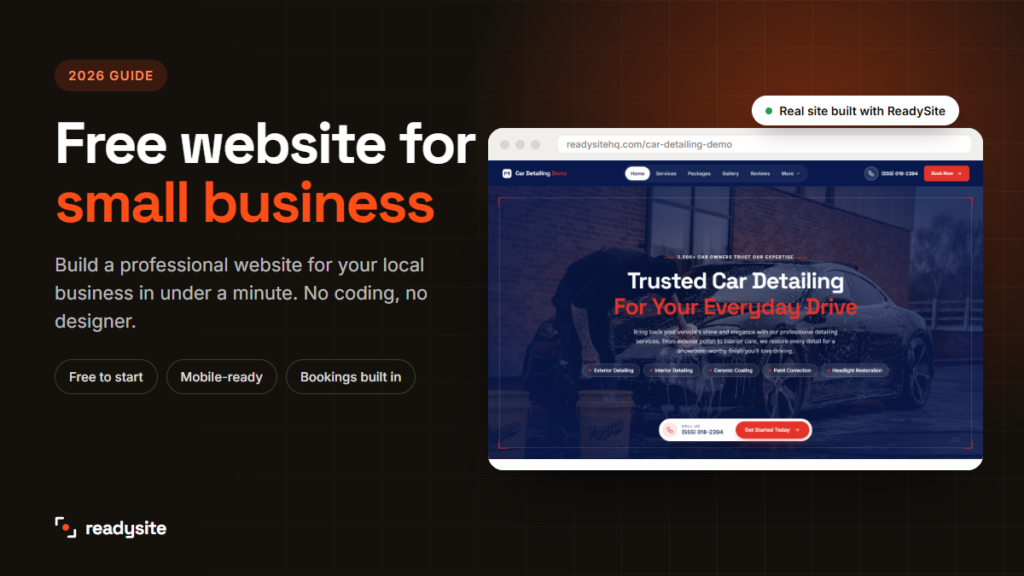
Looking for a free website for small business owners that actually brings in customers? You’re in the right place. Most people now check a business online before they call, book or walk in. Without a website, you’re relying on whatever Google, Facebook or a directory decides to show about you.
The good news: you don’t need a big budget, a designer or any technical skills. In this guide you’ll learn what a small business website needs, how to build one for free in under a minute, how to get it found on Google, and the mistakes that cost local businesses customers.
In this guide
Why every small business needs a website in 2026
Social media pages are useful, but they aren’t yours. Algorithms change, posts get buried, and many customers searching on Google never see them. A small business website is the one place online that you fully control.
Here’s what a website does for you that a social page or directory listing can’t:
- It builds trust. People expect a real business to have a real website. Without one, many will simply choose a competitor who has one.
- It helps you get found. When someone searches “car detailing near me” or “plumber in [your town]”, a website gives you a chance to show up.
- It puts everything in one place. Your services, prices, photos, reviews, opening hours and contact details, all behind one link you can share anywhere.
- It works while you work. A contact form or booking page keeps collecting enquiries even when you can’t answer the phone.
- It makes you look established. A clean, modern website makes a one-person business look as professional as a big company.
If you’ve been putting it off because websites seem expensive or complicated, the rest of this guide will show you that they don’t have to be either.
What does a free website for small business really include?
“Free” means different things on different platforms, so it’s worth knowing what to expect before you start. Most free plans give you a working website, but they come with a few limits.
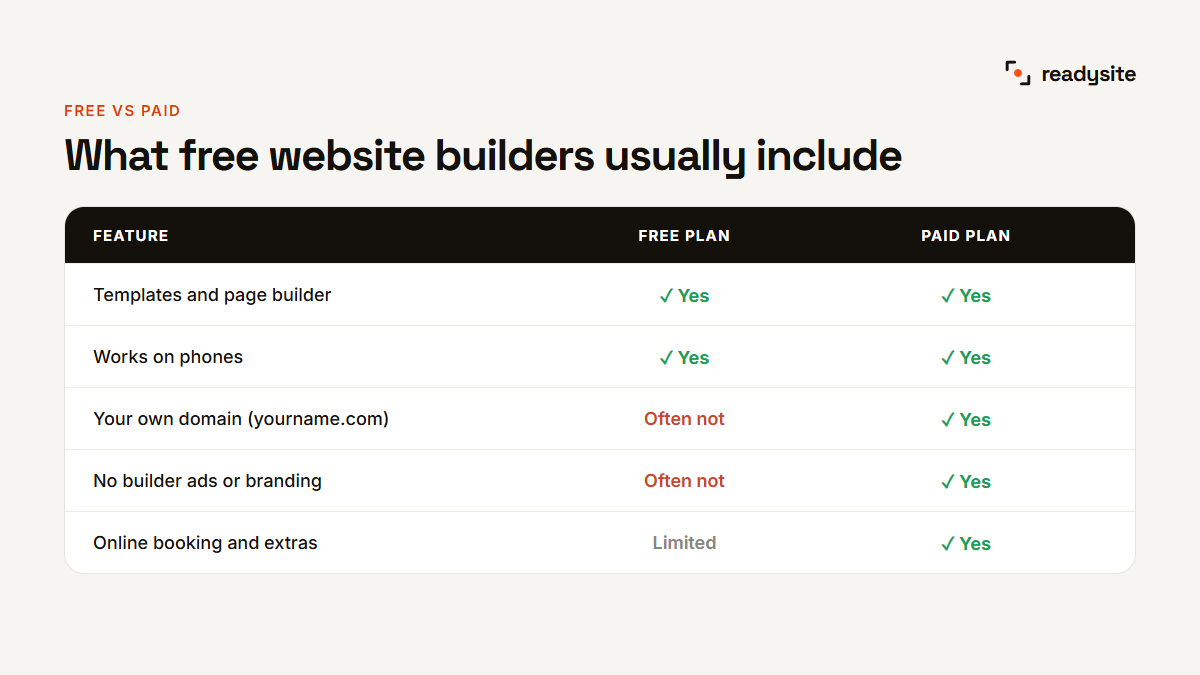
With a typical free website builder you get templates, a page editor and a site that works on phones. What you usually don’t get is your own domain name (like yourbusiness.com), and many free plans show the builder’s ads or branding on your site.
For most new businesses, that’s perfectly fine to start with. A free website for small business owners is the fastest way to get online, test what works and start collecting enquiries. You can always add your own domain later, once the website is earning its keep.
With ReadySite, the Free plan costs $0 forever. You get a complete website on a free readysitehq.com address, a simple visual editor, call, WhatsApp and quote buttons, and an inbox for your enquiries. There are no ads for other businesses on your site.
What a small business website should have
You don’t need dozens of pages. For most local service businesses, one well-built page with clear sections works best. Visitors can see everything in one scroll, and nothing important is hidden behind menus.
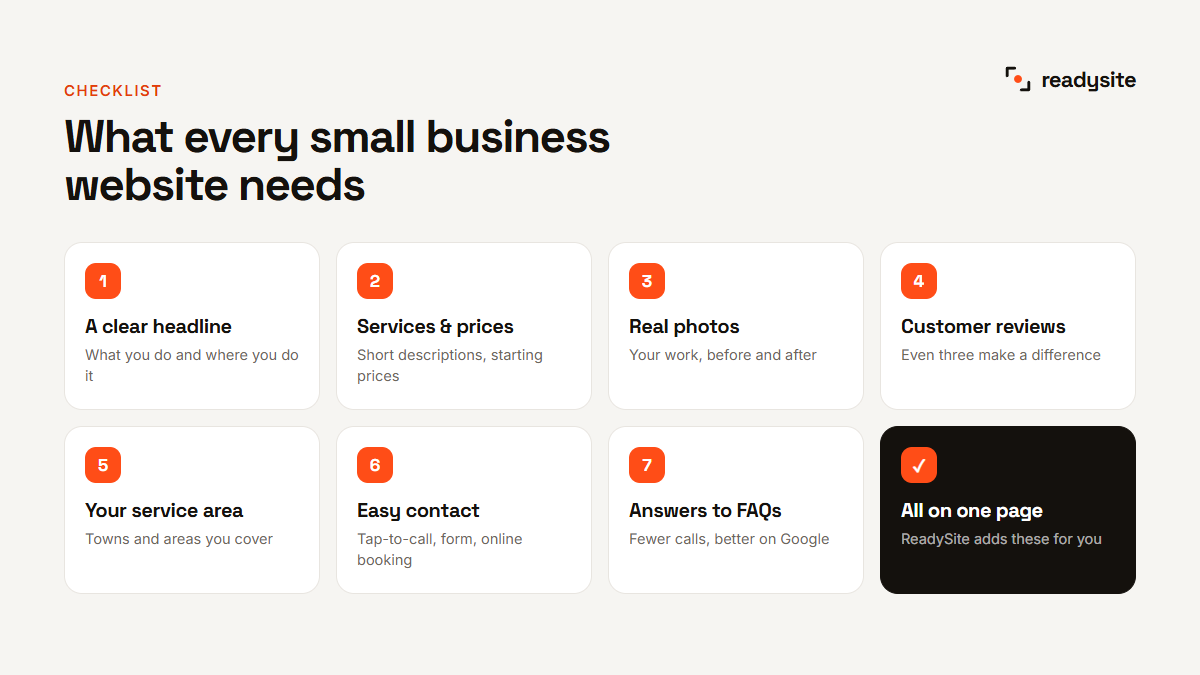
Make sure your small business website has these seven things:
- A clear headline that says what you do and where, for example “Mobile car detailing in Leeds”.
- Your services, ideally with a short description and a starting price for each.
- Photos of your real work. Before-and-after shots are especially powerful.
- Reviews or testimonials from happy customers.
- The area you serve, so visitors instantly know you cover them.
- An obvious way to contact you: a phone number, a contact form and, if you can, online booking.
- Answers to common questions, which save you time on the phone and help with Google.
Everything else is a bonus. A short “about us” section, a special offer or a gallery can all help, but these seven are what turn a visitor into a phone call.
Small business website examples by trade
The right sections depend on what you sell. A good small business website for a mobile detailer looks very different from one for a hair salon. Here’s what matters most for some common local trades.
Car detailing and valeting
Customers buy with their eyes, so before-and-after photos come first. List your packages with clear “from” prices, show the areas you travel to, and add an easy way to book a slot. Mention any protection you offer, such as ceramic coating, and how long it lasts.
Cleaning services
Trust is everything when someone lets you into their home. Show reviews, explain what’s included in each clean, and say whether you bring your own products. A simple quote form that asks for the number of rooms saves you a lot of back-and-forth.
Plumbers, electricians and other trades
Many of these customers have an urgent problem, so your phone number should be impossible to miss. Show your qualifications or memberships, your service area and whether you offer emergency call-outs. Photos of finished jobs help people picture the quality of your work.
Salons, barbers and beauty
Here, style matters as much as information. Use a gallery of your best work, a clear price list and online booking. Introduce the team, because many clients choose a person, not just a place.
ReadySite picks these sections for you automatically based on your industry, so you start with the right layout instead of a blank page. You can see real local business website examples in our showcase.
How to create a free website for small business in 5 steps
Here’s the fastest way to go from nothing to a live, professional site using ReadySite, a free website builder made for local businesses. The whole process takes less time than making a coffee.
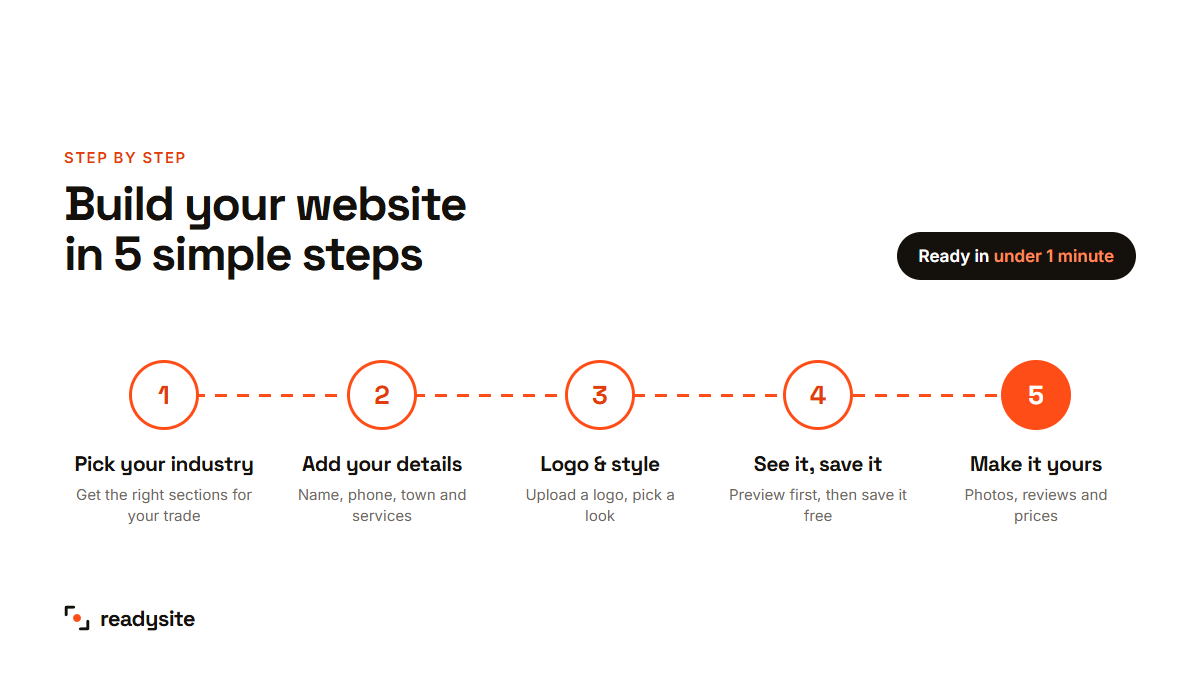
Step 1: Pick your industry
Start by choosing what kind of business you run. ReadySite uses this to pick the right sections, wording and layout for your trade. A car detailer gets before-and-after galleries and packages, while a cleaner gets service areas and booking.
Step 2: Add your business details
Type your business name, phone number and town, then tick the services you offer. Already have an old website or a Google listing? Paste the link and your details can be filled in for you.
Step 3: Add your logo and pick a style
Upload your logo and choose a brand colour if you have one. Both are optional. Then pick the style that suits your business, and you’ll see a preview as you choose.
Step 4: See your website, then save it
Click “Build my site” and your website is ready in under a minute. You can look around it before signing up. If you like it, create a free account to save it and keep editing. Want to see the result first? Get a free website preview.
Step 5: Make it yours
Swap in your own photos, add customer reviews, adjust prices and change any section’s design with a click. Every section comes in several versions, so your site won’t look like everyone else’s.
How to write the text for your website
Even the best design won’t work if the words are vague. You don’t need to be a writer. Just follow these simple rules and keep it short.
Use a simple headline formula
The easiest headline is what you do + where you do it + why you. For example: “Mobile car detailing in Leeds. We come to you, 7 days a week.” Visitors should understand your business within three seconds.
Describe services in plain words
Write the way your customers talk. Say “deep clean of seats and carpets”, not “comprehensive interior rejuvenation”. Two or three sentences per service is plenty, followed by a starting price if you can share one.
Talk about the customer, not yourself
Instead of “We have 10 years of experience”, try “You get a team that’s cleaned over 2,000 cars”. Every sentence should answer the question a visitor is quietly asking: what’s in it for me?
End every section with a next step
Don’t leave visitors wondering what to do. Finish your services, reviews and gallery with a button such as “Get a free quote” or “Book a slot”. If you build a free website for small business use with ReadySite, the wording for each section is written for you to start, and you can change any of it.
Free website builder or paid website: what does it cost?
Website prices vary a lot, from nothing at all to thousands for a custom design from an agency. For a local service business, there are three realistic options.
Option 1: Build it yourself for free
A free website builder is the cheapest way to get online. You do the setup yourself, which with the right tool takes minutes, not weekends. It’s ideal if you’re just starting out or want to test the waters before spending money.
Option 2: Upgrade for your own domain
Once your website is bringing in work, a small monthly plan lets you use your own domain and removes any limits. On ReadySite, the Pro plan is $9 a month: your own domain, connected for you, plus priority help. You can cancel any time.
Option 3: Have it built for you
If you’d rather not touch it at all, you can pay someone to design and write it. ReadySite’s done-for-you website is $299 one time for up to 5 pages, and you see a free preview before you pay anything.
Whichever route you choose, avoid long contracts and setup fees. Your domain and your content should always stay in your name.
How to get your small business website found on Google
A website only helps if people can find it. The good news is that local businesses don’t need to compete with the whole internet, just with other businesses in their area. These simple steps make a big difference.
- Set up your Google Business Profile. It’s free and it’s what puts you on Google Maps. Create or claim your Google Business Profile here, then add your website link to it.
- Mention your town and services in your text. Write “emergency plumber in Bristol”, not just “plumbing services”. That’s what people type into Google.
- Collect reviews. Ask every happy customer for a Google review. Reviews help you rank and help people choose you.
- Keep your name, address and phone the same everywhere. Your website, Google profile and social pages should all match exactly.
- Make it fast and mobile-friendly. Most local searches happen on phones. A slow or awkward site loses visitors before it even loads.
Want to go deeper? Google’s own SEO Starter Guide explains how search works in plain English.
How to turn visitors into paying customers
Getting visitors is only half the job. A good small business website makes it easy for them to take the next step. Here’s what helps most:
- One clear action. Decide what you want visitors to do, such as call, book or ask for a quote, and make that button stand out.
- Prices or “from” prices. People are far more likely to get in touch when they have a rough idea of the cost.
- Proof that you’re good. Reviews, before-and-after photos and the number of jobs you’ve done all build confidence.
- Quick ways to reach you. Tap-to-call, WhatsApp and a short form suit different people. Offer more than one.
- Fast replies. Answer enquiries quickly. The first business to reply often wins the job.
Small changes add up. Moving your phone number to the top, adding prices and replying within an hour can easily double the enquiries you get from the same number of visitors. Review your website every few months and keep improving the parts that bring in work.
Your checklist before you share your website
Before you add the link to your Google profile, van or business cards, spend five minutes checking these points. Open your small business website on your own phone, because that’s how most customers will see it.
- Your phone number is correct and tapping it starts a call.
- The contact or quote form sends the enquiry to you. Send yourself a test.
- Your business name, town and services appear in the headline or the first lines.
- Every photo is yours, or clearly shows the kind of work you do.
- Prices, opening hours and service areas are up to date.
- There are no leftover sample words or placeholder reviews.
- The page loads quickly on mobile data, not just on Wi-Fi.
Once everything checks out, share it everywhere: your Google Business Profile, social media bios, email signature, invoices and quotes. Every link brings in more visitors.
5 common mistakes to avoid
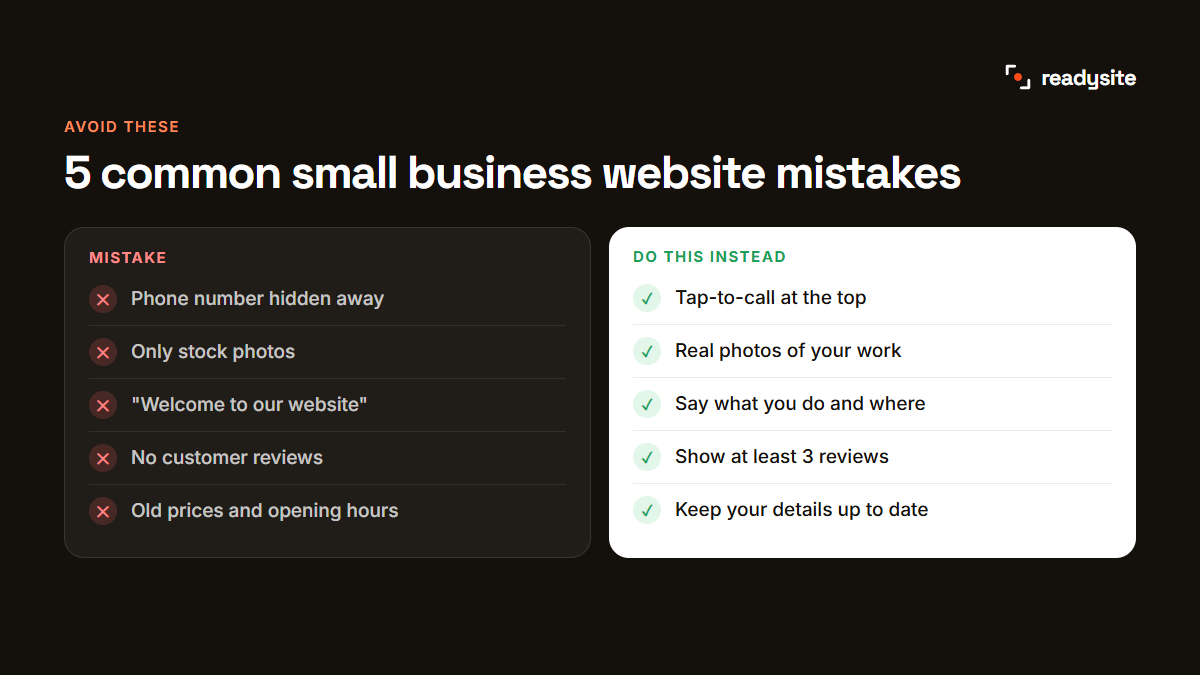
- Hiding your phone number. Put it at the top of the page and make it tap-to-call on mobile.
- Using only stock photos. Real photos of your work and team build far more trust.
- Vague headlines. “Welcome to our website” tells visitors nothing. Say what you do and where.
- No reviews. Even three short testimonials make a big difference.
- Never updating it. Keep prices, services and opening hours current.
Fixing just one of these can noticeably increase the number of calls and enquiries your small business website brings in.
Do it yourself, or let someone build it for you
Building it yourself is the quickest and cheapest option, and with the right free website builder it really does take minutes. But if you’re busy running the business, you can also hand it over.
As a rule of thumb, build it yourself if you enjoy a bit of hands-on work, you’re just starting out, or you want to be online today. Choose done-for-you if your time is better spent on paying jobs, you want the wording written for you, or you need several pages. Either way, you can begin with the free version and decide later, because nothing is lost when you upgrade.
With ReadySite you can start free on your own, or ask our team to design the whole site for you. Browse local business website examples to see what’s possible.
Frequently asked questions
Can I really create a website for my small business for free?
Yes. With ReadySite you can build your website and see it live for free, without any design or coding skills.
How long does it take?
Your first version is ready in under a minute. Adding your own photos and reviews usually takes another 15 to 30 minutes.
Do I need to know how to code?
No. You fill in a short form about your business and everything else is built for you. Changes are made by clicking and typing.
Will my website show up on Google?
Your site is built to be found, with clear headings, fast pages and mobile-friendly layouts. To rank well, add your town and services in your text, collect reviews, and keep your Google Business Profile up to date.
Get your free website for small business today
A professional website is one of the cheapest, most effective ways to win more local customers. With a free website for small business owners like ReadySite, you can have yours live in less time than it takes to make a coffee. Build your free website now, or see a free preview first.