Google Ads for Car Detailing: A Small-Budget Setup That Brings Calls (2026)
How to run Google Ads for a car detailing business: Search ads vs Local Services Ads, a small campaign setup, keywords and negatives, service area targeting and call tracking.


Google Ads for car detailing can put your business at the top of the page at the exact moment someone types “car detailing near me” or “ceramic coating in your town.” That is a very different moment from scrolling a social feed. The person searching already wants a detail, and often wants one this week. If your ad and your website make it easy to call, a small budget can turn into real bookings.
It can also turn into wasted money very quickly if the setup is loose. Broad keywords, the wrong towns and a homepage that hides the phone number are the usual culprits. This guide walks through the choices a small detailer actually has to make: Search ads or Local Services Ads, how to build one tidy campaign, which keywords to pay for and which to block, how to target only the area you can reach, and how to measure what each booking costs. Nobody can promise a result, but these basics give your budget a fair chance.
Need the website first? You can build a free car detailing website in a few minutes, with your packages, prices and a quote button, or start from a detailing template.
How Does Google Ads For Car Detailing Work?
Google Ads shows a few paid spots above and below the normal results whenever someone searches. You choose the searches you want to appear for, write an ad, set a daily budget and decide where people land when they click. Each time someone clicks, you pay. Google decides which ads to show and in what order based on your bid and on how relevant and useful your ad and landing page look, which it sums up as Quality Score. A clear ad that leads to a clear page usually costs less per click than a vague one.
Search Ads And Local Services Ads Are Different Products
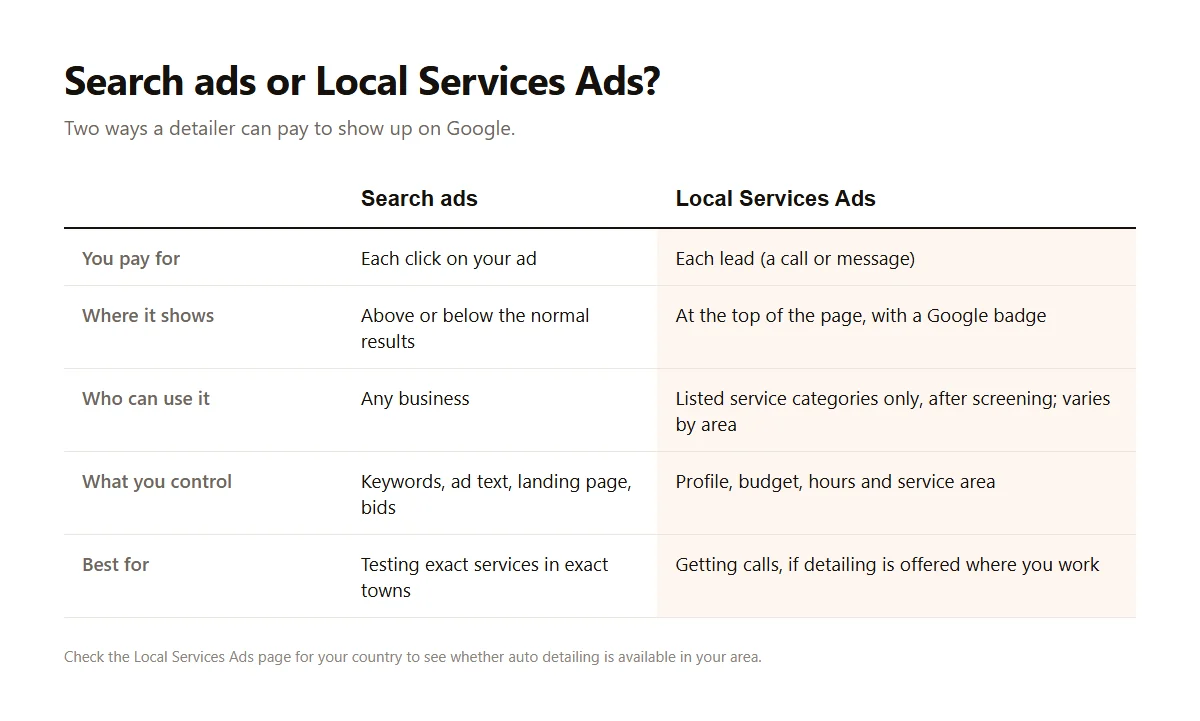
There are two ways to run Google Ads for car detailing. Search ads are the classic text ads: you pay per click, and you control the keywords, the wording and the page people land on. Local Services Ads are a separate product with a “Google” badge, shown at the very top, where you pay per lead such as a call or message rather than per click. They are only open to certain service categories after a screening process, and the list of categories differs by country and area. Google’s getting started guide for Local Services Ads explains how to check eligibility. If auto detailing is not offered where you work, Search ads are your option.
What You Actually Pay For
With Search ads you pay for clicks, not calls, so every click that does not turn into a call or a form is a cost. That is why the page people land on matters as much as the ad itself. Click prices vary a lot by town and by service. Ceramic coating searches in a busy city tend to cost far more per click than “interior detailing” in a small town. Rather than trusting a national average, start small, watch your own numbers for a few weeks and decide from there.
When Ads Make Sense, And When They Don’t
Google Ads for car detailing is a good fit when you have open slots to fill, a phone you can answer and a website that shows your prices and a call button. They are a poor fit when your calendar is already full, when your Google Business Profile has few reviews, or when your website is slow and buries the phone number. Ads amplify what you already have. If the basics are weak, fix them first with car detailing SEO and a solid Google Business Profile, then add ads on top.
Done-for-you websites
Want your website built for you?
ReadySite writes the wording, builds up to 5 pages and sets up your Google Business Profile. $299 one time, and you see a free preview before you pay.
Setting Up Google Ads For Car Detailing On A Small Budget
You don’t need a complicated Google Ads account. For most owner-run detailers, one Search campaign with a few tightly grouped ad groups is enough to learn what works. Keep it small enough that you can check it in ten minutes a week. The steps below follow the order you will meet them in Google Ads, and they assume you are setting things up yourself rather than handing it to an agency.
Choose The Right Goal And Campaign Type
When Google asks for a goal, pick leads, then choose a Search campaign. Turn off the Display Network and search partners at the start, so your search ads only show on Google itself, because they send cheaper but much less interested traffic, and a small budget gets eaten fast. Google will also suggest automatic campaign types that decide most things for you. They can work once you have tracking and some data, but for a first month it is easier to learn from a campaign where you can see exactly which searches triggered your ads.
Group Your Ad Groups By Service
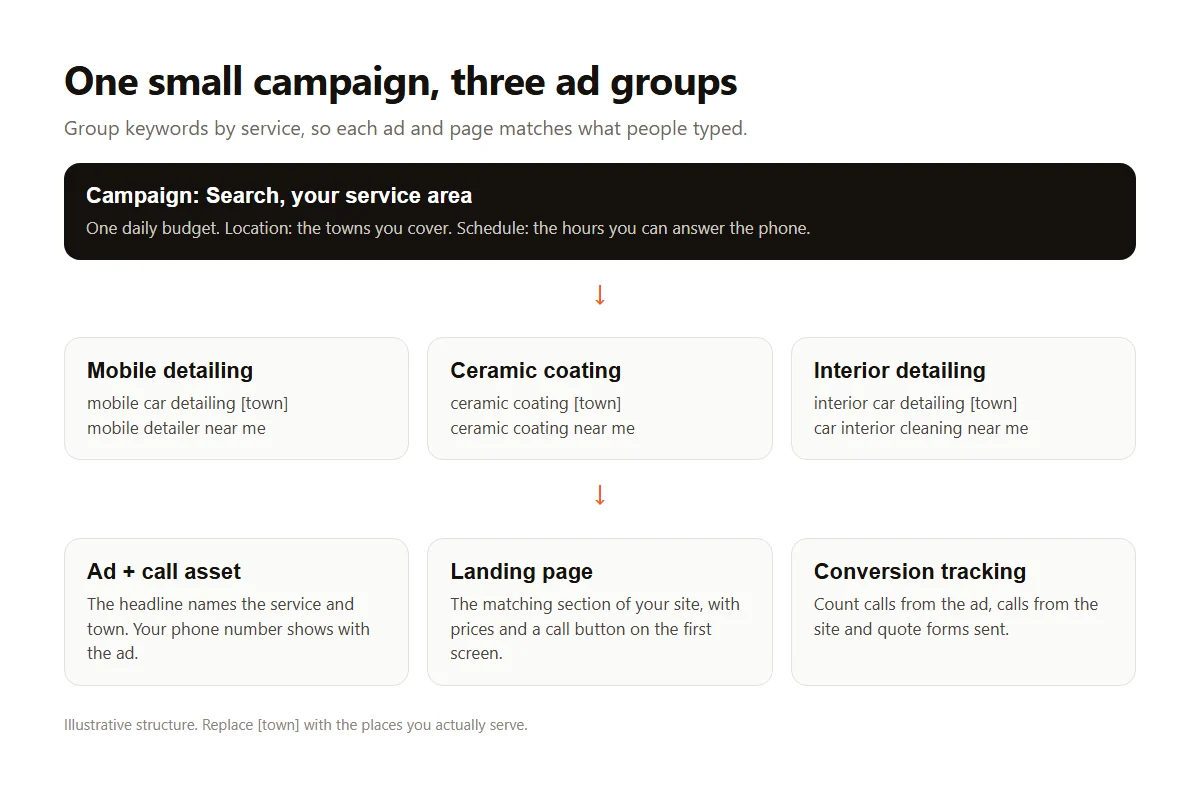
Make one ad group per service you want more of, such as mobile detailing, ceramic coating and interior detailing. Each ad group gets its own short list of keywords and its own ads that mention that service by name. This keeps the ad close to the search, which helps clicks and Quality Score. It also tells you which service actually brings calls, so you can move budget toward the work you enjoy most or earn the most from.
Write Ads That Answer The Search
Good search ads for a detailer repeat the service and the town, says something specific and gives a reason to call now. “Mobile Detailing in Mesa, We Come To You” beats “Best Car Care Solutions.” Add a starting price if you are comfortable showing one, because it filters out people looking for a $20 wash. Mention real details such as your hours, service area or how far ahead you book. Avoid claims you can’t back up, such as “best in town,” which the FTC’s advertising guide for small businesses warns about.
Set A Budget You Can Afford To Test
Choose a daily budget you could spend for a month without stress, and treat that month as a test. Many small detailers start somewhere between $10 and $20 a day, but the right number depends on your area and your prices. Use manual or capped bidding at first so a single click can’t cost more than you are comfortable with. Schedule ads for the hours you can actually pick up the phone, because a missed call from a paid click is money gone.
That is the whole first setup: one campaign, a few service groups, honest ads and a budget you can live with. The next step is deciding exactly which searches you will pay for, which is where most of the money is saved or lost.
Keywords, Negatives And Match Types For Detailers
Keywords decide who sees your search ads. The goal is to pay only for searches from people who want a detail done in your area, not for people who want a detailing job, a detailing course or a bottle of wax. Google lets you choose how closely a search must match your keyword, and lets you block words you never want to pay for. Getting these two settings right is usually the biggest single improvement a small account can make.
Pick Phrase And Exact Match First
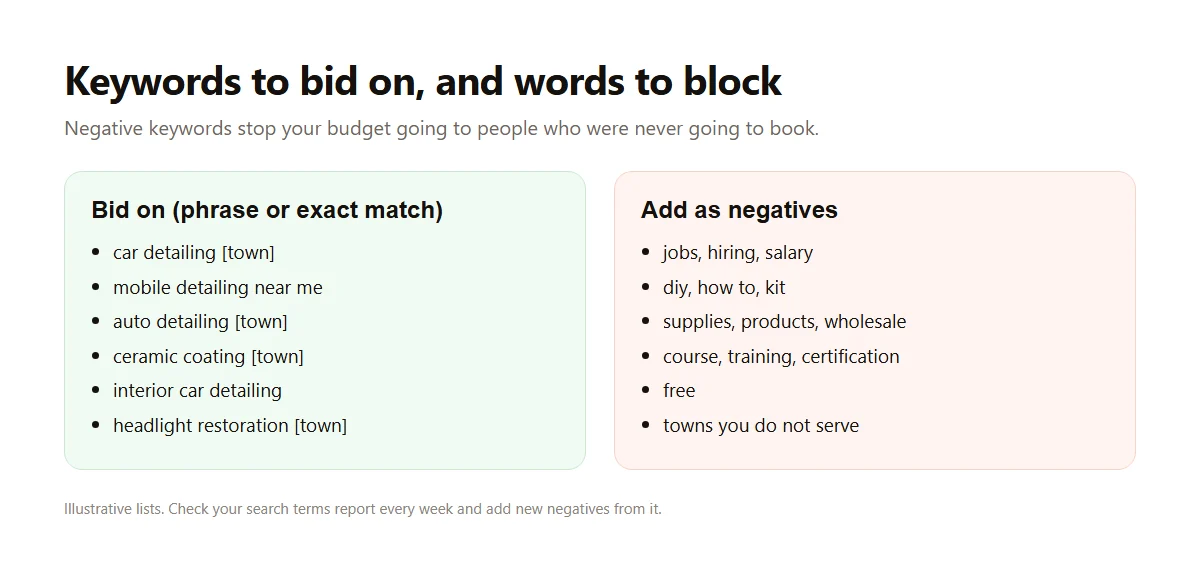
Google’s keyword matching options range from broad, which can show your ad for loosely related searches, to phrase and exact, which stay much closer to your words. On a small budget, start with phrase and exact match for searches like “car detailing [town],” “mobile detailing near me” and “ceramic coating [town].” Broad match can find good searches you hadn’t thought of, but it needs strong tracking and a bigger budget to steer, so save it for later.
Block The Searches That Never Book
Negative keywords stop your ad from showing for searches that contain certain words. Google’s page about negative keywords explains the settings. For detailers, common negatives include jobs, hiring, salary, DIY, how to, kit, supplies, wholesale, course, training and free. Add the names of towns you don’t serve too. Every week, open the search terms report, look at what people actually typed and add anything irrelevant as a negative.
Match Keywords To Your Real Services
In Google Ads for car detailing, only bid on services you offer and want more of. If you don’t do paint correction, don’t let your ads show for it, even if the clicks look cheap. If ceramic coating is your most profitable job, give it its own ad group and its own landing section. It is better to own three searches well than to appear weakly for thirty. This also keeps your ads honest, which customers notice when they arrive at your site.
Search ads reward focus, and so do Local Services Ads where they are offered. A short list of services, phrase and exact keywords and a growing list of negatives will usually beat a long list of broad keywords, especially on a budget of a few hundred dollars a month.
Targeting Your Service Area And Getting The Call
Even a perfect Google Ads keyword wastes money if the person is fifty miles away or lands on a page where they can’t find your number. This part of the setup is about where your ads show and what happens after the click. For a local service business, those two things often matter more than clever ad wording, and they are easy to get right once you know where to look.
Show Ads Only Where You Can Work
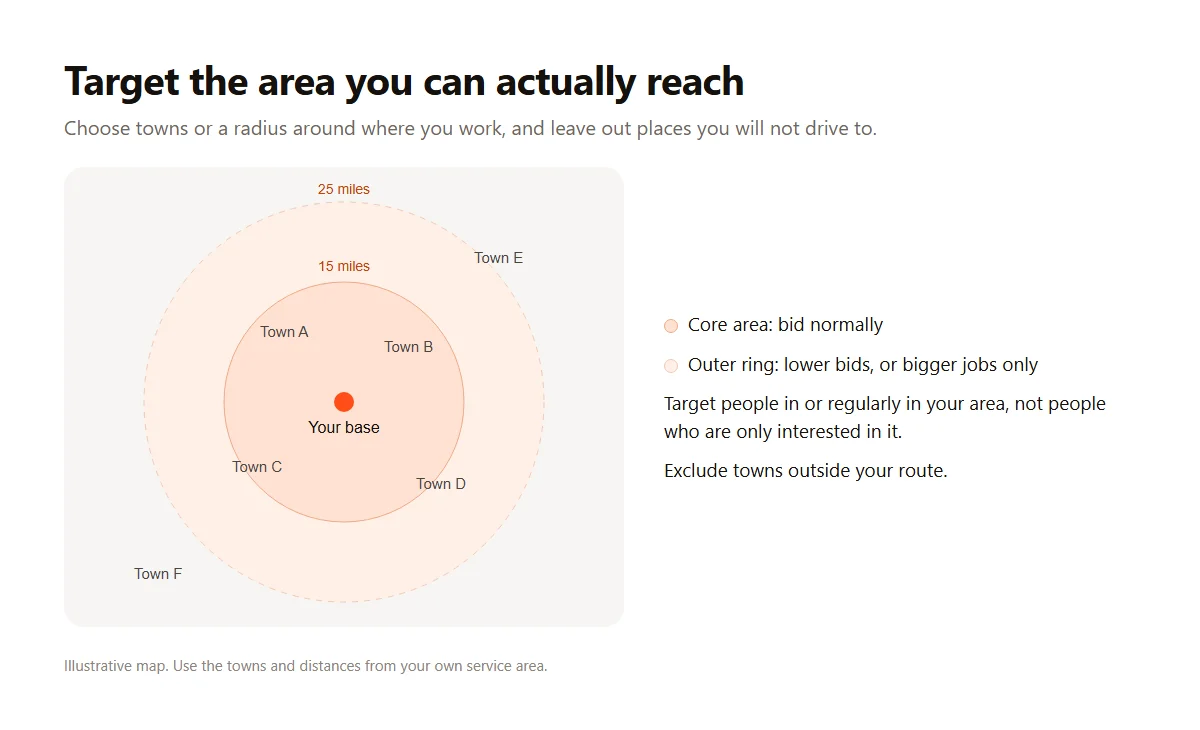
Google’s guide to targeting ads to geographic locations shows how to choose towns, ZIP codes or a radius. Pick the area you can reach without losing money on travel. In the location options, choose to reach people who are in or regularly in your area, rather than people who are only interested in it, or you may pay for clicks from other states. If you drive farther for big jobs, you can lower bids at the edges of your area instead of switching them off.
Add Your Phone Number With A Call Asset
A call asset adds your phone number to the ad, so people on a phone can tap to call without visiting your site. Google’s page about call assets explains how to set it up and how calls are counted. For a detailer, calls are often the most valuable lead, because the customer is ready to talk and book. Schedule the call asset for the hours you answer, and use a number you actually pick up.
Send Clicks To A Page Built To Convert
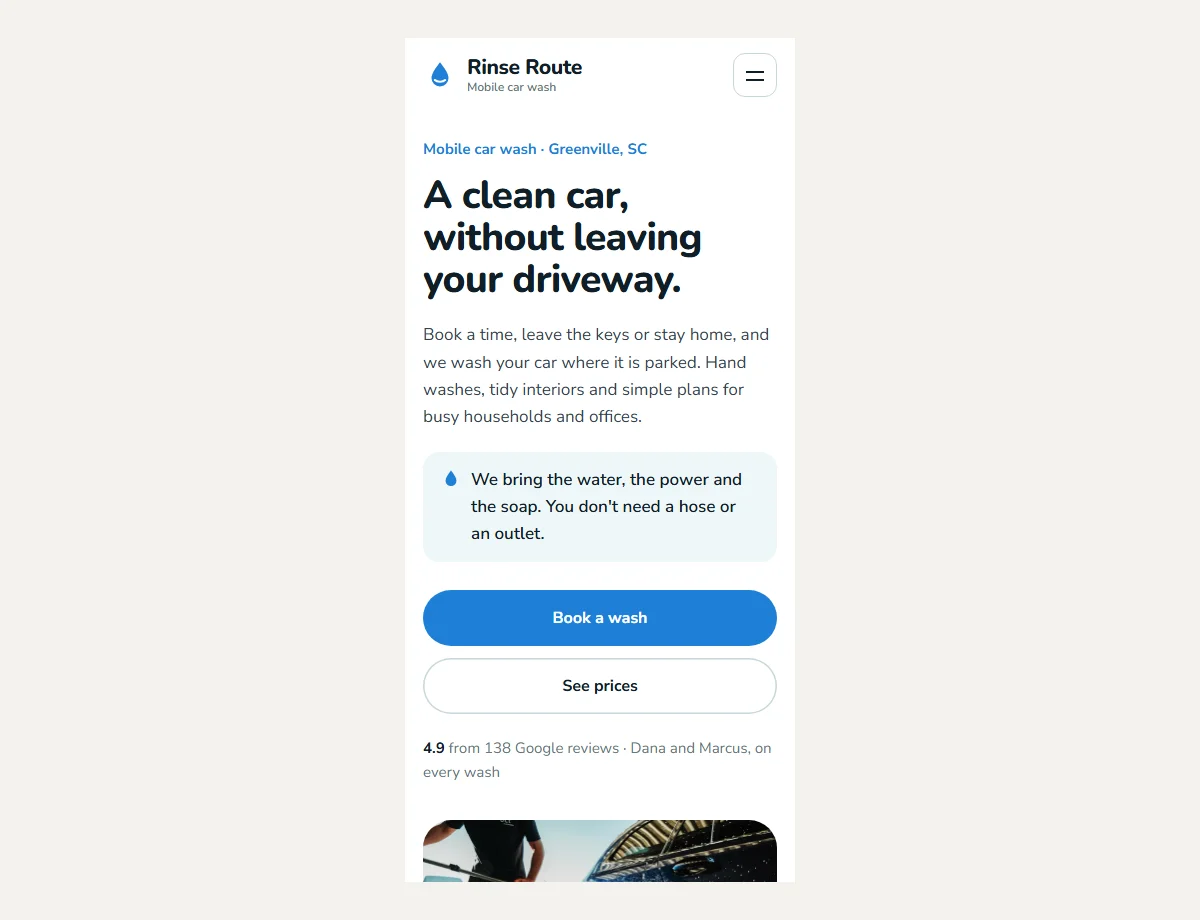
The page people land on should match the ad: if the ad says ceramic coating, the page should start with ceramic coating, a starting price and a call button. In ReadySite’s study of 100 detailer websites, only 61% showed a call link on the first screen of a phone, so this is where many paid clicks are lost. A clean, fast page with your prices, service area, reviews and a short quote form gives each click its best chance.
Should You Use Your Homepage Or A Separate Page?
For a small Google Ads account, a well-built homepage with clear sections for each service is usually fine, as long as the ad links to the right section and the first screen shows a call or book button. A separate page for your most important service can help once you are spending more. What matters is that the visitor sees what they searched for, a price range and a way to contact you within a few seconds.
Location, calls and the landing page are where ads turn into bookings. If your current site makes that hard, fixing it is often cheaper than raising your budget, and it helps every other source of customers too.
Tracking Results And Keeping Costs Honest
Google Ads only make sense if you know what they bring in. Google can count clicks easily, but clicks don’t pay the bills. You need to know how many calls and quote requests came from the ads, how many of those booked and what each booking cost. Setting this up takes an hour, and it is the difference between guessing and knowing whether Google Ads for car detailing works for your business.
Set Up Conversion Tracking For Calls And Forms
Google’s overview of conversion measurement explains how to count actions that matter. For detailers, that usually means calls from the ad, calls from your website and quote forms sent. Count those as conversions, not page views. If you use a booking tool, see if it can report bookings back. Without tracking, Google’s automatic bidding has nothing useful to aim for, and you can’t tell a good month from a bad one.
Work Out Your Cost Per Booking
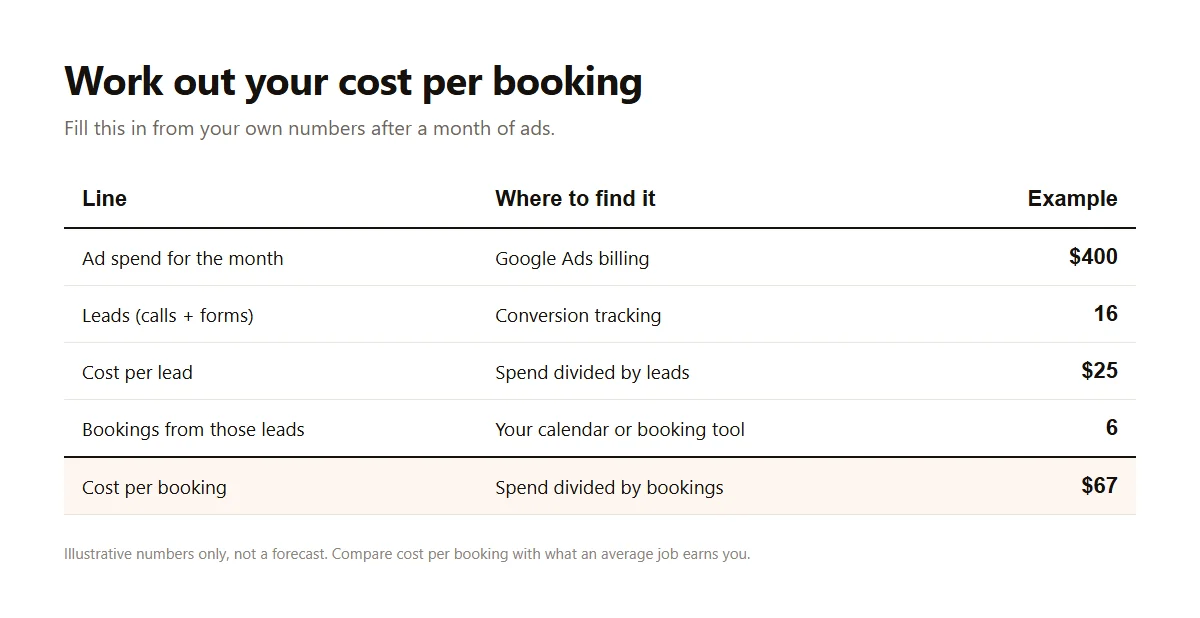
After a month, divide what you spent by the number of leads to get cost per lead, then divide what you spent by the number of bookings to get cost per booking. Compare that with what an average job earns you after supplies and time. If a booking costs $60 and your average detail earns far more, the ads are paying. If not, tighten keywords, fix the landing page or pause the weakest service before raising the budget.
Check The Account For Ten Minutes A Week
Once a week, open Google Ads, look at the search terms report and add negatives, check which ad groups brought calls, and make sure the phone was answered during ad hours. Once a month, compare cost per booking by service and move budget toward the winners. Small, regular changes beat big rebuilds. If you get stuck, it is fine to pay for help, but keep ownership of your Google Ads account so your history stays yours.
How Do Google Ads Compare With Facebook Ads?
Search ads reach people who are already looking for a detailer, while Facebook and Instagram reach people who weren’t searching but might be interested, such as car owners in your area before summer. Search usually costs more per click and books faster. Social ads are often cheaper per lead but need more follow-up. Our guide to detailing Facebook ads covers that side, and many detailers use both once each is tracked.
Tracking turns Google Ads for car detailing from a cost into a decision. With calls and forms counted, you can see exactly what a booking costs and adjust each month with confidence instead of hope.
Conclusion
Google Ads for car detailing works best when it is small, focused and measured. Decide whether Local Services Ads are available in your area, build one Search campaign grouped by service, bid on phrase and exact keywords, block the searches that never book and target only the area you can reach. Add a call asset, send clicks to a page with your prices and a call button, and count calls and forms so you know your cost per booking.
If your website is the weak link, fix it before you pay for search ads. You can build a free detailing website with ReadySite in a few minutes, with call and quote buttons already on the first screen, or browse website templates made for automotive businesses. Prefer to have it done for you? Ask for a free preview and only pay if you like it.
Done-for-you websites
Want your website built for you?
ReadySite writes the wording, builds up to 5 pages and sets up your Google Business Profile. $299 one time, and you see a free preview before you pay.