Tree Service Website: Free Setup With Call and Quote Buttons
How to show removal, trimming and storm work online, with call and quote buttons, and how to set it up free.


A website for tree service owners has to calm someone down before it can sell anything. Picture a homeowner staring at a big oak that’s leaning toward the garage after last night’s wind, or a split limb hanging over the neighbor’s fence. They’re about to let strangers run saws above their house, and they’re wondering what happens if something falls the wrong way.
This guide is for the small crew with a chipper, a truck and maybe a bucket or a good climber. It covers what a tree service website should prove up front, how to describe removal, trimming, stump and storm work, and how to collect photos of the tree before you drive out. There’s also a free way to set it up, if you have nothing online yet.
Free website builder
Build a free website for your tree service business
Answer two questions and ReadySite writes your site and adds call, WhatsApp and quote buttons. It takes a few minutes and costs $0 to start.
What A Website For Tree Service Should Prove First
Tree work is one of the few home services where a bad day can put a limb through a roof. Your customers know that, and many have heard about crews who vanish after a storm. Before they read about the stump grinder on your tree service website, they want to know you’re real, covered and careful around their property.
Insurance, Only If You Carry It
The first question a careful homeowner asks is “Are you insured?” If you carry liability and workers’ comp, say so clearly near the top of your tree service website, and add that you’ll send a certificate on request. That offer does more than the words “fully insured,” since people can check it. Coverage and licensing rules differ by state, so make sure what you write matches your actual policy and your local requirements.
If you don’t carry a type of coverage, don’t hint that you do. The ReadySite builder leaves “insured” out unless you tell it, and it’s a fair rule for anything you write yourself. A claim like that can come back to hurt you badly the first time a branch lands on a fence and the customer asks to see your paperwork.
Who Is Actually On The Crew
Homeowners worry about who is in their yard, so use your tree company website to show your people. Use your name, a photo of the crew by the truck, and a sentence on how long each of you has climbed if you want to share it. If someone on your crew is an ISA Certified Arborist, name that person. The ISA’s Find an Arborist directory lets people find and verify credential holders, so only say it if it’s true and current.
Don’t borrow the word “arborist” if nobody holds the credential. Many good crews have never sat the exam, and you can say what you do know instead: “We’ve been climbing and removing trees in this county for years” is perfectly fair if it’s accurate. A tree company website that claims less and shows more tends to come across as more honest anyway.
How You Protect The Yard
After safety, people reading a tree service website picture the mess: ruts across the lawn, a crushed flower bed, sawdust in the pool. Say how you handle it. Do you use plywood or mats for the machines? Do you rope limbs down over the roof, or bring in a crane for tight jobs? Is cleanup included, and do you haul the wood or leave it stacked for firewood? Each answer you give here is one less question on the walk-through.

Done-for-you websites
Want your website built for you?
ReadySite writes the wording, builds up to 5 pages and sets up your Google Business Profile. $299 one time, and you see a free preview before you pay.
Key Services On A Tree Service Website
Visitors to a tree company website often don’t know the difference between crown thinning and topping, or whether the stump comes out with the tree. Describe your work in plain language so people can see which job they need. If you also do yard work, the landscaping website guide covers that side, and pest control crews face similar trust questions in the pest control website guide.
Removal And Trimming As Separate Jobs
Removal and trimming bring in different customers, so give each its own line on your tree service website. For removal, mention whether you handle trees close to houses or power lines, and what is included, such as hauling and leaving the stump or grinding it. Power line work has its own safety rules, so check who is allowed to do it where you are, and tell customers when the utility needs to be called first.
For trimming, name what people actually ask for: dead limbs over the driveway, branches rubbing the roof, a view cleared, weight taken off a heavy limb. If you won’t top a tree because it harms it, say why in a sentence. That’s the kind of detail that shows you care about the tree as well as the invoice, and it can help a customer trust your judgment.
Stump Grinding As Its Own Line
Stump grinding brings in its share of small jobs, often from people who had a tree cut years ago. List it separately on your tree service website, and answer the questions you hear: how deep do you grind, what happens to the chips, can your machine fit through a 36-inch gate? Mention if you do it as a stand-alone job or only with a removal, so nobody calls you for a stump you won’t take on.
Storm Cleanup Without The Storm-Chaser Look
Storm work has a reputation problem. The FTC’s advice after weather emergencies warns that unlicensed contractors and scammers often appear in recovery zones, tells people to be skeptical of anyone promising immediate clean-up, and says to walk away from cash up front. A homeowner who has read that may be wary of you too. So don’t let your tree company website sound like the people it describes: skip the “Storm Damage? We’re In Your Area Now!” banners.
Instead, let your tree service website show you were here before the storm and will be here after. Give a local address or at least your home town, name the neighborhoods you’ve worked in, and promise a written estimate. Say how you handle payment. If you work with insurance adjusters, describe how, but don’t tell people what their policy covers. A little calm goes a long way when their street is full of trucks with out-of-state plates.

Hazard Assessments And Permit Questions
“Is this tree going to fall?” is a question your tree company website can invite, and it’s a good reason for someone to call before anything breaks. If you do hazard assessments, explain what you look at, like cracks, fungus, root lift or a new lean, and whether there’s a charge. Be careful not to promise more than a visual look can tell you. Only a qualified person should put a formal risk report in writing.
People also ask, “Do I need a permit to take this down?” Rules for removal vary by city, and protected species or historic districts can bring extra steps. Tell them that you can help them check with the city, if you do, and avoid stating the rule for your whole area. A website for tree service customers that says “we’ll check the local rules with you” sounds right and won’t go out of date.
List only what you really do, and you’ve covered the main reasons people will contact you. Keep each description short, and use the wording customers use on the phone. Most visitors to a tree company website are looking for one job, so make it easy to spot. You can add detail later on, once you know which jobs you want more of.
How To Set Up A Free Website For Tree Service Owners
You can have a working page without losing a day off the saw. Here’s a simple order to do it in, using ReadySite as the example. The same ideas, especially the one about photos, will work with whatever you end up using, so take what helps. A free website for tree service owners only needs the basics to start.
Type What You Do And Where
The builder asks for your business name and “What do you do, and where?” Be specific: “tree removal, trimming, stump grinding and storm cleanup in Asheville.” It writes the wording, picks free stock photos and colors, and builds a one-page site in a few minutes, with click-to-call, a WhatsApp button and a quote form. It only uses facts you gave, so add your real coverage and credentials afterward in the visual editor.
Invite Photos Of The Tree Over WhatsApp
Most tree quotes start with “Can you send me a picture?” The quote form on a ReadySite page doesn’t take uploads, so don’t tell people to attach a photo there. Use the WhatsApp button instead, and invite them with a clear line on the page: “Send us photos of the tree on WhatsApp and we’ll tell you if it’s a job for us and roughly what to expect.” You can still decide to visit before giving a firm price.
Tell them which photos help, since most people will send one blurry shot from the kitchen window. Ask for the whole tree from a distance, what it’s leaning over, the trunk at the base, and how a truck would get to it. Photos can sort a quick stump job from a crane job before you burn fuel on the drive, although a final price may still need a look in person.

Check What The Finished Page Looks Like
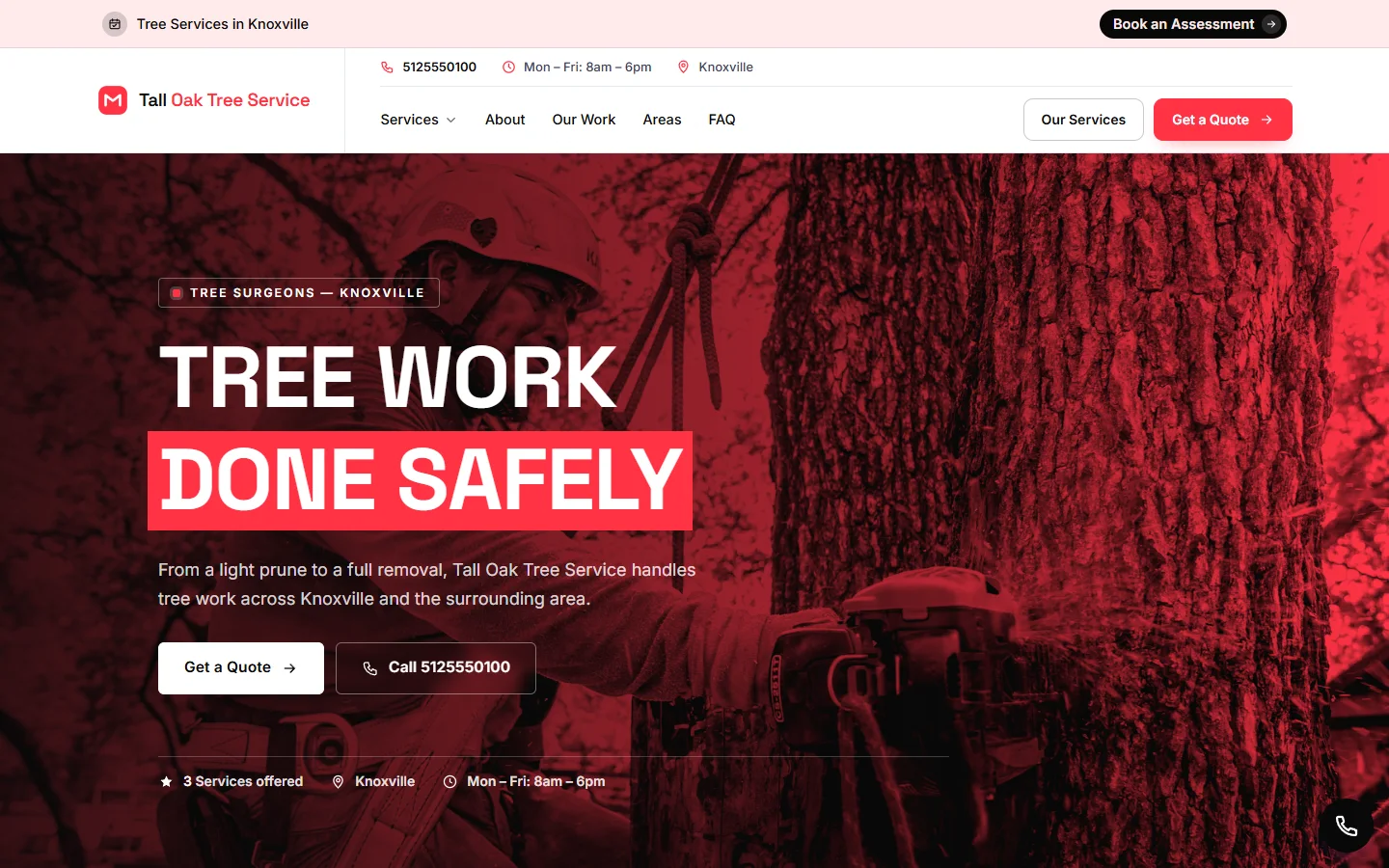
The picture below is an example of a tree service website for a made-up business, so use it to study the layout. Note how the services, the call button and the service area come early. Before you share your own tree service website, swap in real job photos, like a removal with the crew tied in, or a clean yard after the work is done. Stock photos of someone else’s crew are no substitute.
Decide If You Need Your Own Domain
The Free plan is $0, on a readysitehq.com address, and it may be fine while you test a tree service website. Your name on the truck door looks better with your own domain behind it. Pro is $9 a month with the domain bought separately, connected for you, and you can cancel any time. No website can promise you jobs, but a clear page can help people who hear your name decide to call.

That’s a free website for tree service owners up and running, without a big project. Send the link to a friend and ask them to find your phone number and the word “stump.” Then read it on your phone in bright daylight, which is roughly where you’ll be when you show it to a customer.
Mistakes To Avoid On A Tree Service Website
A tree job is big money for most homeowners, and they often only need one every few years. They don’t have much to go on, so small wording choices weigh a lot. These are the mistakes that can make an honest crew look like the kind of outfit people are warned about.
Emergency Wording You Can’t Back Up
“24/7 emergency tree removal” sounds good until the phone rings at 2 a.m. and you can’t safely climb in the dark anyway. Only put emergency wording on your tree company website if you truly respond, and say what you can do at that hour, like making a tree safe or tarping, with the full removal to follow in daylight. If you don’t do emergencies at all, say how soon you can get out instead. People would rather have a true answer than a false comfort.
Scaring People Into A Removal
“That tree could come down any minute” is a line homeowners have heard from door knockers. Avoid scare wording on your tree company website, and don’t use dramatic photos of crushed cars that aren’t yours. Lay out what you look for and let them decide. If a healthy tree only needs some weight taken off, saying so can earn you their trust, and perhaps the removal they really do need in a few years.
Borrowed Photos And Empty Claims
Tree work is very visual, and people who look closely at a tree service website can spot a stock photo of a climber in a landscape that looks nothing like theirs. Use your own photos, including the ordinary jobs. Skip phrases like “best in the county” that you can’t prove, along with years in business you haven’t reached. If you have only a few jobs to show so far, a handful of honest photos is enough to get going.
Bought Or Filtered Reviews
Sample reviews on a new tree service website are placeholders, so replace them as real ones come in. Ask every customer when the yard is clean, and send your Google link. Don’t trade a discount on stump grinding for a review, and don’t ask only the customers who seemed happy. The FTC’s rule on fake reviews bans fake ones and bans paying for a particular sentiment. Your Google reviews can go on your site once you have them.
Fixing these takes less time than a single stump. A website for tree service work earns trust by being plainly accurate, so read every claim on your page and ask whether you could back it up on a homeowner’s lawn. If you couldn’t, take it out or reword it before you share the link.
Tree Service Website Questions
Here are a few things small tree crews often ask before they put a page up.
Is It Really Free?
ReadySite’s Free plan is $0 and gives you one page on a readysitehq.com address (readysitehq.com/your-business), the editor, call, WhatsApp and quote buttons, an inquiries inbox and a dashboard. If you’d rather stay in the tree and have someone else build your tree company website, the done-for-you option is $299 one time, with up to 5 pages, the wording written for you and your Google Business Profile set up. You get a free preview before you pay.
Can Customers Schedule An Estimate Online?
Every site, including Free, gets a booking page at /book/your-business/, where a customer picks a service and a free time and leaves their details. You get an email, and you mark it Confirmed once you’ve looked at your schedule. It takes requests only, so it’s better for estimate visits than for a tree that’s already on the house.
Is One Page Enough For A Tree Company Website?
For a small crew in one area, one page is usually a fine place to start. If you want to show several kinds of work in depth, or serve a wide area where people search each town, separate pages may suit you better. You can add them later with a larger site or the done-for-you option.
Conclusion
A good website for tree service customers is mostly proof: real coverage, a real crew, clear descriptions of removal, trimming, stump and storm work, and an easy way to call or send a photo. Keep emergency wording and credentials to what’s true, and check local permit and licensing rules rather than guessing them for your customers.
If you have nothing online yet, a free website for tree service owners is an easy way to start. Type what you do and where, add your real photos and details, and invite people to send a picture of the tree. You can make your tree service website better between jobs as you learn what customers ask.
Free website builder
Build a free website for your tree service business
Answer two questions and ReadySite writes your site and adds call, WhatsApp and quote buttons. It takes a few minutes and costs $0 to start.
Done-for-you websites
Want your website built for you?
ReadySite writes the wording, builds up to 5 pages and sets up your Google Business Profile. $299 one time, and you see a free preview before you pay.