Free vs Paid Website Builder: What Free Really Costs and When to Upgrade
A free plan is a fine start. Here is what it leaves out, how to work out the real 3-year cost, and the seven signs that it is time to pay.


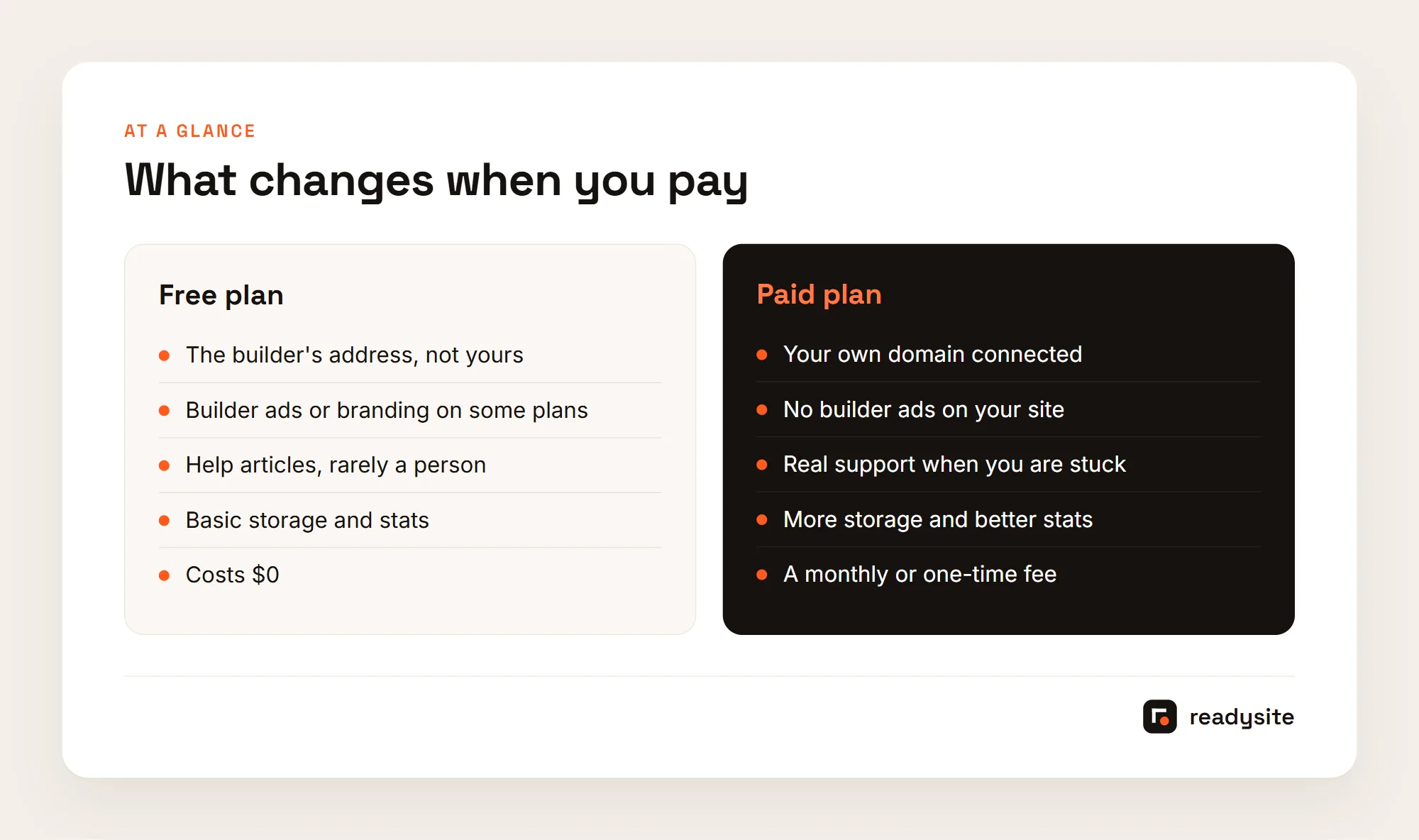
In the free vs paid website builder decision, most local service businesses should start free and pay only once the free plan begins to cost them trust or jobs. A free plan gives you a working site with your services, area and contact buttons at no cost. A paid plan mainly adds your own domain, removes the builder’s ads or branding, and gets you real support. Those things matter, but not on day one.
This guide explains what a free website builder plan really includes, the costs that don’t show up on the pricing page, and how to work out your true three year cost. It then covers the signs that it’s time to upgrade, how the answer changes as your business grows, and the mistakes to avoid before you pay anyone. Plan details were checked on official pricing pages in October 2026. Prices change, so check the current page before you decide.
What The Free Vs Paid Website Builder Choice Means
Free plans have become genuinely useful. On most builders you get hosting, an editor, templates and a published site you can share, with no time limit. For a plumber, cleaner or detailer who has no website at all, that is a big step up from a Facebook page. The real question isn’t whether free works. It’s what you give up, and when that starts to matter for your business.
What A Free Plan Usually Includes
What you get varies by builder. A general free website builder hands you a blank template and leaves the writing to you. A builder made for local businesses, like ReadySite, builds the site from your answers and includes call, WhatsApp and quote buttons on the free plan, with inquiries collected in a dashboard. Either way, you can publish your services, your towns and a phone number today and share the link with customers. For a new business, that alone answers the first question people ask: are you real, and do you come to me?
What A Paid Plan Usually Adds
Across almost every free website builder, the free plan has the same limits. Your site lives on the builder’s address, something like yourbusiness.wixsite.com, yourbusiness.wordpress.com or yourbusiness.readysitehq.com. There is usually some branding or ads. The WordPress.com pricing page states that free sites show WordPress.com ads to visitors, and the Wix plans page puts removing Wix branding on its Premium plans. Support is often help articles and forums rather than a person. Storage, analytics, payments and bookings are usually limited or paid. A paid plan lifts some or all of those limits.
Why Your Own Domain Is The Biggest Difference
For a local business, the most practical difference is the address. Yourname.com is short, easy to say over the phone and easy to print on a van or a card. A long free address works, but it’s harder to remember and it can look temporary next to a competitor’s site. Branding, support and extras matter less to most service businesses than this one line. That’s why the free vs paid website builder decision often comes down to one question: are you ready to put your own domain on things people keep for years?
The Costs A Free Website Builder Doesn’t Show
Free means no invoice from the builder. It doesn’t mean no cost to your business. A builder’s ad bar or a long free address won’t stop people calling, but it can tip a close decision toward a competitor who looks more established. Your time counts too. If a free website builder needs an evening to set up and an hour every time you change a price, put your hourly rate on those hours. A paid plan that saves you six hours a year may be cheaper than free.
Then there are lost inquiries and switching costs. A form that sends to an inbox you never check loses jobs quietly, so tap your own call button and send yourself a quote request every month. And if you print the free address on your van, moving later means reprinting. That’s why the cheapest step in this whole decision is buying your domain early, in your own name. Our guide to a free website with a custom domain shows how.
Done-for-you websites
Want your website built for you?
ReadySite writes the wording, builds up to 5 pages and sets up your Google Business Profile. $299 one time, and you see a free preview before you pay.
How To Work Out The Real Three Year Cost
Monthly prices hide the real number. A plan that looks cheap at a few dollars a month adds up over three years, and a one time fee that looks expensive may be the cheaper path. Write down each option you’re considering, from staying on a free website builder to a paid plan or a one time build, and work through the same lines for each one, so you compare like with like.
Count The Plan And The Domain
Start with the builder plan. Multiply the monthly price by 36. Check the renewal price too, since some first year prices go up after the first term. Then add the domain. Domain renewal prices vary by registrar and ending, such as .com or .net, so use the renewal price rather than the first year discount. These two lines are usually the whole cost of a paid plan, and they’re the numbers most people never multiply out before signing up.

Add Email And Setup Fees
Business email such as you@yourbusiness.com is usually a separate monthly service. Skip this line if you’re happy with your current email. Then add any one time fee for a template or a done for you build. A one time fee can look large next to a monthly price, but spread over three years it’s often similar or smaller. Writing it down next to the monthly options is the only way to see that clearly.
Put A Price On Your Time
The last line is the one most owners skip. Estimate the hours to set up the site and keep it current over three years, then multiply by what an hour of your work is worth. A free website builder that takes ten hours of fiddling isn’t free if your time bills at a real hourly rate. Be honest here. If you enjoy editing the site and have quiet evenings, your time cost may be low. If every hour competes with paid work, it’s high.
Example Of Three Options For A One Van Detailer
Illustrative example with round numbers. Stay free: $0 for the builder, but six hours of setup and a free address on the van. Free builder plus own domain on a $9 a month paid plan: about $324 over three years plus the domain. A ready-made template set up on your domain for a one time fee: the fee plus the domain, and less of your time. The right answer depends on how much your time and a professional look are worth to you, which is exactly what the worksheet makes visible.
Once the numbers are on paper, the free vs paid website builder choice usually gets easier. For a detailing-specific breakdown with more line items, see what a detailing website really costs over 3 years.
When Is It Time To Move To A Paid Plan?
You don’t need to upgrade the day you publish. Upgrade when the free plan starts holding the business back. These are the signs worth watching for. Two or more of them usually means a paid plan is worth it. None of them means your free website builder plan is still doing its job.
You Are About To Print
Vans, cards, flyers and yard signs last years. Before you order any of them, put your own domain on them, not a free address. Reprinting is expensive, and every old card in a customer’s drawer keeps pointing to the old address. If you’re about to place a print order, that alone is a good reason to buy and connect your domain first. It’s the one sign on this list with a hard deadline, because the print order sets the address for years.
Customers Question Whether You Are Real
If anyone asks whether you’re a real business, your website isn’t doing its job of reassuring them. The same goes if competitors look more trusted. Search for your service in your town and compare honestly. If every other result has its own domain and a clean site, and yours shows a builder’s ad bar, that gap may be costing you calls you never hear about. A paid plan that removes the ads and adds your domain closes it.
Ads Show Up Next To Your Services
If the builder shows its own ads on your site, a competitor’s offer or an unrelated product could appear beside yours. That’s a distraction at the exact moment someone is deciding whether to call. Check your site on a phone, logged out, to see what visitors actually see. Some builders don’t show ads at all on free sites, so this sign depends on which free website builder you picked.

You Need Business Email Or Real Support
A matching email address on quotes and invoices looks more professional than a free email account. Paid plans also usually include real support. If you lose hours to small problems, like a form that won’t send or a page that looks wrong on a phone, that support pays for itself quickly. Count the hours you lost last month. If the number surprises you, a paid plan may be cheaper than it looks.
The Site Already Brings You Work
If you get a few inquiries a week from your website, a small monthly fee is easy to justify. One extra job a year usually covers the cost of a basic paid plan many times over. At this point the site is part of how you earn money, and it deserves the same care as your equipment. A paid plan with your own domain and real support is a small cost to protect it.
What We Found When We Built A Test Site
When we built a test site on October 28, 2026, its free address was the ReadySite domain followed by /sites/shine-test-detailing/, made from the business name. That works for sharing a link today, but it is long to read out on a call or print on a van. An unsaved test site is kept for three days, so save yours before you share it. The dashboard’s Finish your website checklist ends with Put it on your own domain, which is the step a custom domain covers.
If none of these apply, stay on your free plan and spend the money on something else, like a good photo of your work or a Google Business Profile update. Upgrading because a banner told you to is the most common way people overpay.
Free Vs Paid Website Builder By Business Stage
The right answer to the free vs paid website builder question changes as the business grows. Here is how it usually plays out for a local service business, from the first month to the point where you’re fully booked, plus the main ways to pay once you decide to.
Just Starting And Testing Your Offer
In the first months you’re still working out your services, prices and the areas you want to cover. Things change every few weeks. A free plan lets you publish now and change everything without paying for a design you’ll outgrow. Buy your domain if you can, but there’s no need to connect it yet. For a full walkthrough, see how to create a free website in minutes, and if you’re still choosing a tool, our list of the best free website builder options for local businesses scores the main choices.
Getting Steady Work Each Week
Once you have regular customers, reviews and a van or business cards, the business looks settled and the website should too. This is usually the point where a small monthly paid plan with your own domain earns its keep. The trade-off tips toward paying because the cost is now small compared with one job. Example (illustrative): a cleaner starts with a free site in month one, buys her domain in month four before ordering car magnets, and moves to a paid plan in month six once inquiries arrive most weeks.
Established And Busy With Little Spare Time
When you’re fully booked, your time becomes the expensive part. At this stage many owners stop editing the site themselves and pay once for a done for you build, then make only small changes. The deciding factor is no longer the plan price. It’s how many hours the website takes away from paid work. Paying someone to write and build a few pages can be cheaper than a month of late evenings at the laptop.

Monthly Plan, One Time Fee Or Done For You
Paying doesn’t always mean a subscription. On ReadySite, as of October 2026, the Free plan is $0, on a readysitehq.com address. Pro is $9 a month and connects a domain you own, bought separately in your name. A ready-made template is $29 one time, set up on your domain. Done for you is $299 one time for up to five pages with the wording written for you, and you see a free preview before you pay anything.
Whichever free website builder or paid service you choose, the principle is the same: pay for the thing you actually need next, not the biggest plan on the page. Most owners move through these stages over a year or two, and that’s fine.
Here are those ReadySite options in one place, as of October 2026.
| Option | Price | What you get |
|---|---|---|
| Free | $0 | A complete site on a readysitehq.com address |
| Pro | $9 a month | Your site on a domain you own, connected for you |
| Template | $29 one time | A ready-made one-page design set up on your domain |
| Done for you | $299 one time | Up to five pages, wording written for you, free preview before you pay |
Mistakes To Avoid Before You Pay Any Builder
Before you move from a free plan to a paid one, or pay anyone to build your site, get clear answers to a few questions. A good provider will answer every one in writing. Most of the expensive surprises owners run into come from skipping these checks.
Ignoring The Renewal Price
Some plans are discounted in the first year and cost more after. Ask for the price in year two and year three, and use that number in your three year cost. Also ask about add-ons you’ll need. Booking, payments, extra pages or removing branding can each be a separate charge. A plan that looked cheap can double once you add the features a service business actually uses, so put every add-on on your worksheet before you commit.
Letting Someone Else Own Your Domain
Your domain should be registered in your name, with the login in your hands, not the builder’s or a designer’s. If someone else holds it, leaving them can mean losing the address on your van and cards. Ask directly who the registrant is, and get the login details before you pay. This one check protects you more than any feature on a pricing page.
Signing A Long Contract Without Reading It
Monthly plans you can cancel any time carry less risk than a long commitment. Find out what happens if you cancel: whether you keep your domain, your text and your photos, and whether the site goes offline straight away. Ask what support looks like too, whether it’s email, chat, phone or a help center, and how quickly they reply. Compare these answers side by side and the free vs paid website builder decision turns from vague plan names into real costs and real risks.
Falling For Free Done For You Offers
Some companies offer to build a free website and then charge a high monthly fee, often with a contract and a domain they control. Read the terms carefully. A fair offer shows you the price up front, lets you see the work before you pay, and leaves the domain in your name. If an offer sounds free but the monthly fee is buried in the small print, treat it as a paid plan and compare it on your worksheet like any other.
None of these checks take long, and each one can save you money or a painful move later. Ask them once, write down the answers, and keep them with your domain login. If you’re still choosing a tool, our guide to the best free website builder for small business sorts the options by type of business.
Conclusion
The free vs paid website builder question has a simple answer for most local businesses. Start with a free plan that already includes call and quote buttons, buy your domain early in your own name, and work out the three year cost of each option including your time. Upgrade the month two or more of the signs appear, and pay for the one thing you need next rather than the biggest plan on the page.
If you run a local service business, you can build your website free with ReadySite and see your services online in a few minutes, then move to Pro when you’re ready for your own domain. Rather have it done for you? Request a free preview and only pay if you like what you see.
Done-for-you websites
Want your website built for you?
ReadySite writes the wording, builds up to 5 pages and sets up your Google Business Profile. $299 one time, and you see a free preview before you pay.