Car Detailing Website Template: Free, Ready-Made Designs (2026)
What a good car detailing website template includes, section by section, with real screenshots, plus how to set one up free in minutes.


A car detailing website template gives you every section a detailing business needs, already laid out and ready for your name, prices and photos. Instead of staring at a blank page for weeks, you fill in the gaps, check the details and go live. For a busy owner who would rather be polishing paint than fighting with page layouts, that difference matters a lot.
This guide shows what a strong car detailing website template includes, section by section, using screenshots from Cardiff Car Detailing, a site on our Showcase that was built with the ReadySite template. You’ll also learn how to pick a website template, how to make it look like your own business, which mistakes to avoid, and how to decide between a template and a custom site. If you want finished designs to browse first, our car detailing website templates each come with desktop, tablet and phone previews.
If you don’t have a site yet, make your car detailing website free: type your business name and services, and ReadySite writes the page for you.
What A Car Detailing Website Template Means
A car detailing website template is a ready-made layout designed for detailers. It comes with the sections customers look for, such as services, packages, a photo gallery, reviews, a service area and a contact form, already designed and placed in a sensible order. You swap in your business name, phone number, town, prices and photos, and the detailing website template handles the spacing, fonts and how everything looks on a phone. There are two kinds you’ll come across, and they work very differently.
Theme-Style Templates You Fill In Yourself
These are designs for tools like WordPress or Wix. You buy or download a theme, then fill in every page yourself. They often look great in the demo because the demo was written and photographed by a designer. Once you install one, you still do all the writing, the setup and the testing. Many also need extra plugins or a paid hosting plan before they work properly, so the real cost and time can be much higher than the price tag suggests. They suit owners who enjoy tinkering and have spare evenings.
Industry Templates That Fill Themselves In
The second kind starts from your answers. You tell the builder your business name, phone number, town and services, and the website template is built with those details already in place. This is how ReadySite works, and it’s the fastest way to get a car detailing website online. You still review every section and change anything you like, but you start from a page that already talks about your business instead of a demo full of placeholder boxes and sample text from someone else’s company.
Why A Template Beats A Blank Page
Most detailers are busy washing, polishing and coating cars, and designing a website isn’t the job. A template saves you from three common problems. Time: a blank page can take weeks of evenings, while a website template gets you to a first version in minutes. Guesswork: a good layout already answers what goes at the top, whether to show prices and where reviews belong. Cost: a custom agency site often runs to hundreds or thousands of dollars, while a template costs little or nothing.
There’s one more reason that matters more than people think. Customers looking for a detailer usually decide quickly. They want to see your work, your prices and a way to book. A detailing website template puts those things exactly where people expect them, so fewer visitors leave without calling. If you’re still deciding whether you need a car detailing website at all, read why a car detailing business website is worth having.
Done-for-you websites
Want your website built for you?
ReadySite writes the wording, builds up to 5 pages and sets up your Google Business Profile. $299 one time, and you see a free preview before you pay.
Key Sections Of A Car Detailing Website Template
Not every template is made for detailers. A general business layout might have a “Team” page and a blog, but no packages or before and after photos. These are the sections a car detailing website template should include, with real examples from the Cardiff site, grouped in the order a visitor usually scrolls through them.
A Hero That Says What You Do And Where
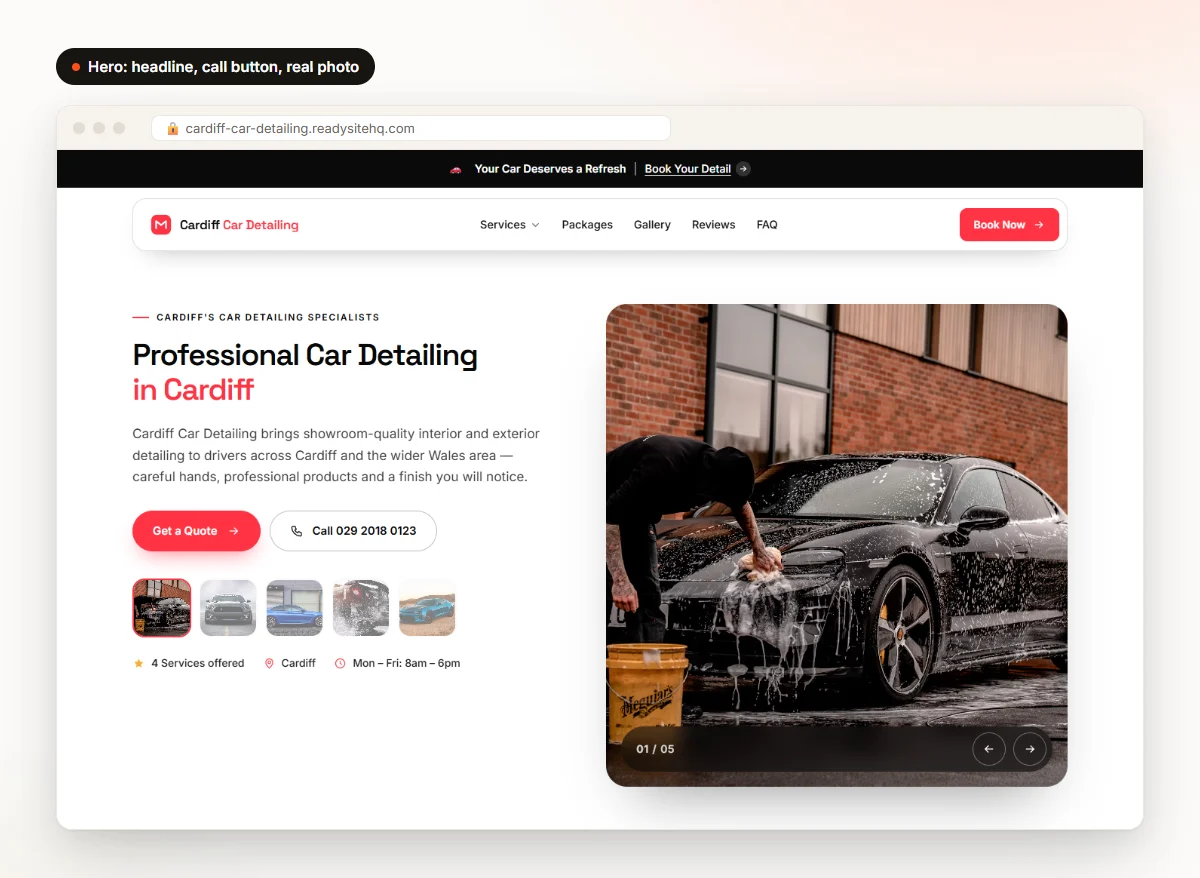
The first screen should tell visitors three things in a few seconds: you detail cars, you work in their area, and they can contact you right now. The Cardiff hero does this with “Professional Car Detailing in Cardiff,” a short line about the service, a Get a Quote button and a call button with the phone number written out. Look for a car detailing website template where the hero uses a real photo of a car, not an abstract graphic. People want to see the kind of work they’re paying for.
Services, Packages And Reasons To Choose You
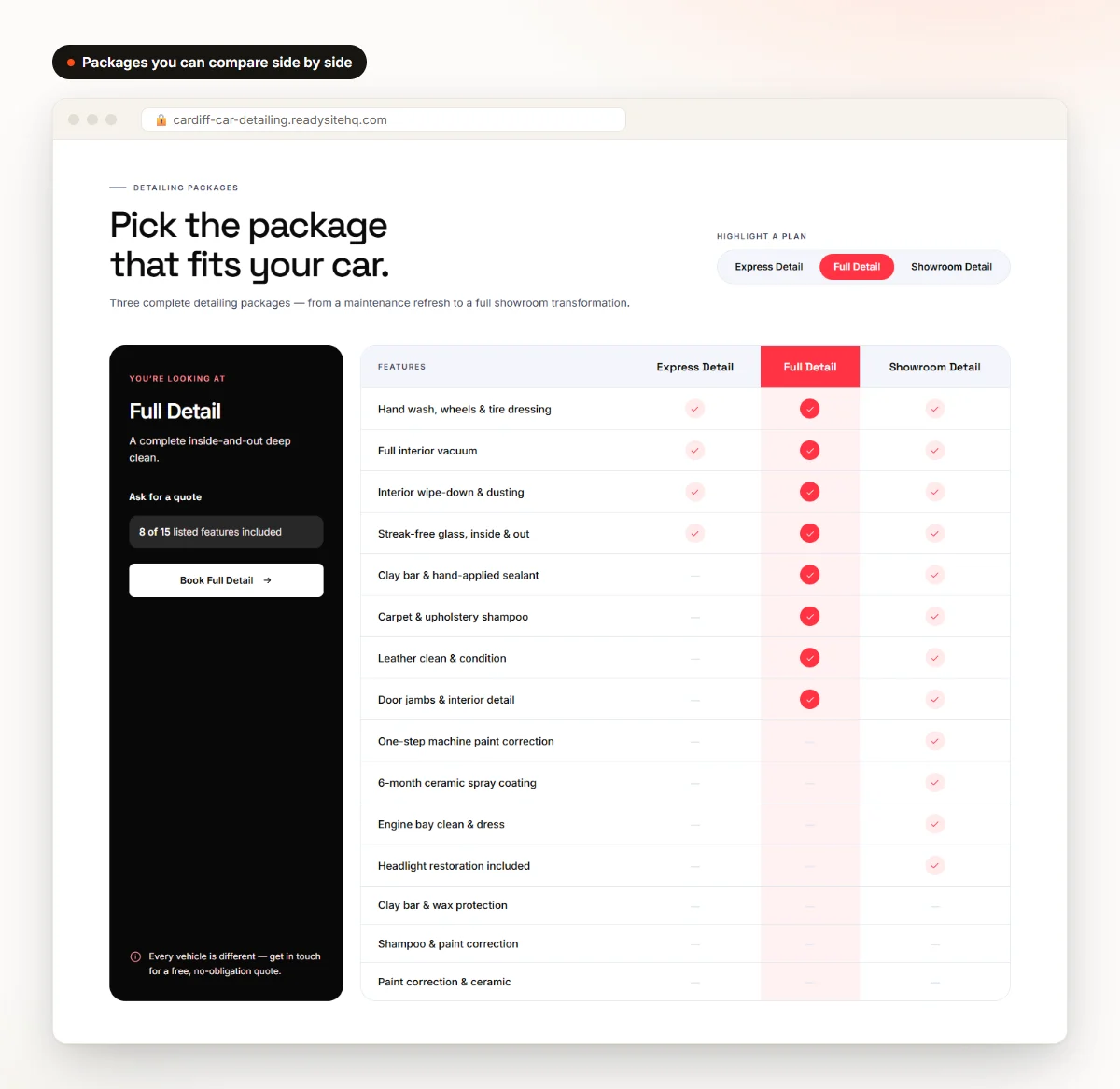
List your main services, such as interior, exterior, full detailing and paint correction, with one or two lines each. Customers don’t need a paragraph about every product; they need to know which service fits their car. Packages are where most people make up their mind, so a good detailing website template shows about three side by side. The Cardiff site uses a comparison table, so visitors can see exactly what the Full Detail adds over the Express Detail. Not sure what to charge? See our guide to car detailing prices.
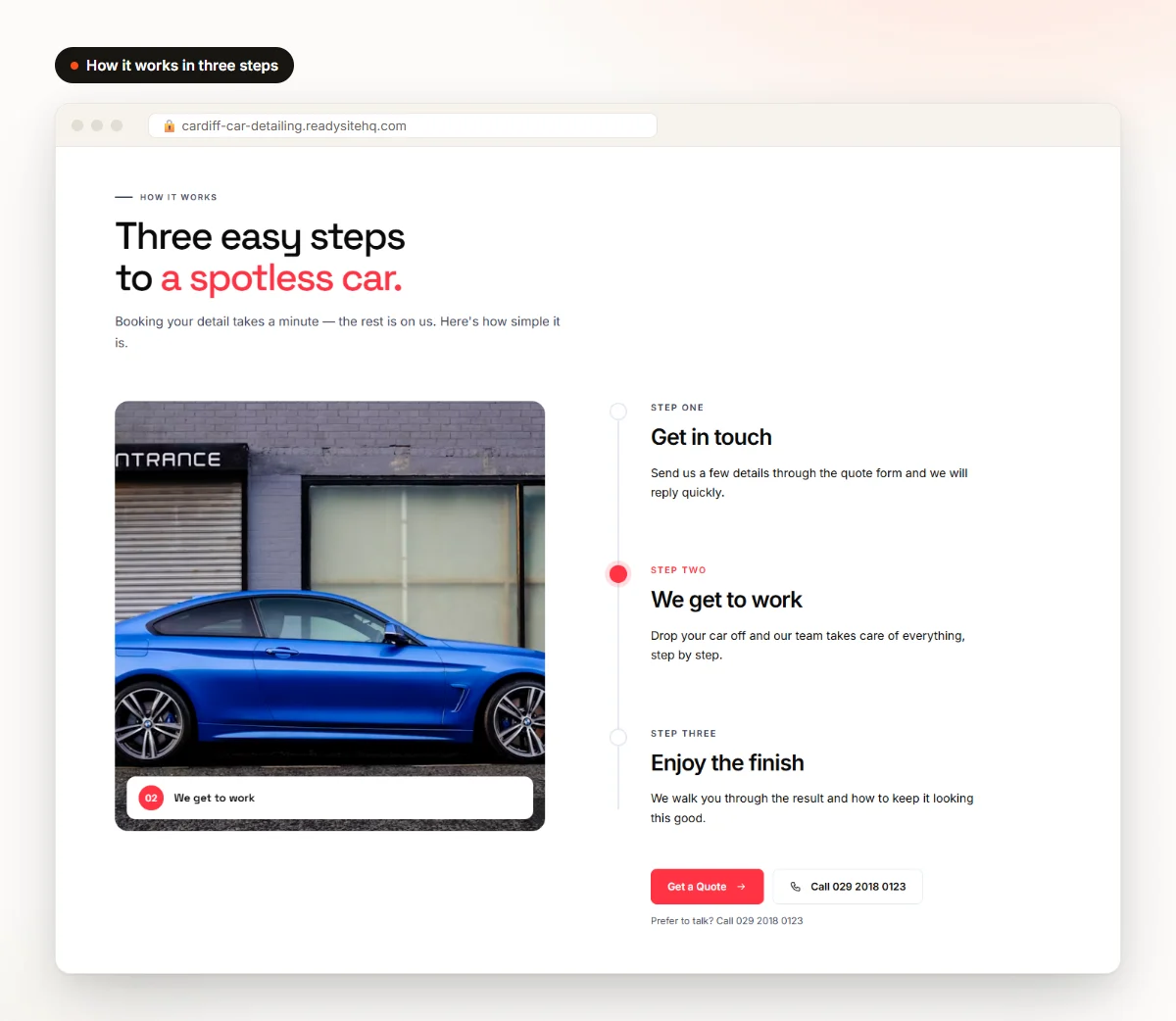
Next comes a short “why choose us” section. Keep it to a few honest reasons, like free quotes, careful products, flexible booking or mobile service. ReadySite limits this section to four reasons on purpose, because a short list is easier to read and easier to believe. A simple “how it works” strip with three steps, such as get in touch, we get to work, enjoy the finish, quietly removes hesitation for first-time customers who don’t know how detailing works.
A Gallery Of Real Work And A Clear Service Area
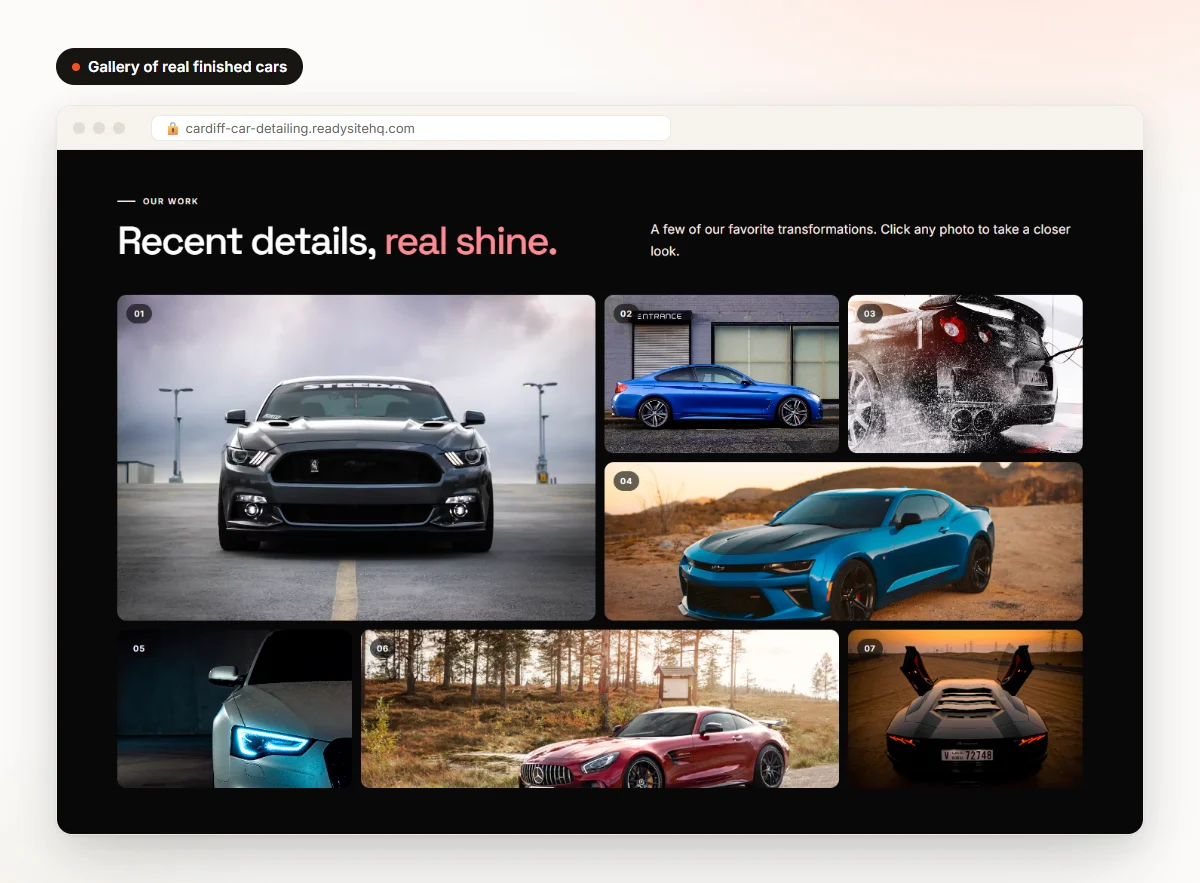
Photos sell detailing. Your website template should have a gallery that shows cars large and clear, with a mix of interiors, exteriors and close-ups of paint. Replace any sample images with your own photos as soon as you can, because real work beats stock photos every time. If you’re mobile or serve a few towns, say so clearly. The Cardiff template lists the areas covered and includes a small checker where visitors type their town. That also supports your local visibility, which our car detailing SEO guide covers.
FAQ, Contact And A Layout That Works On Phones
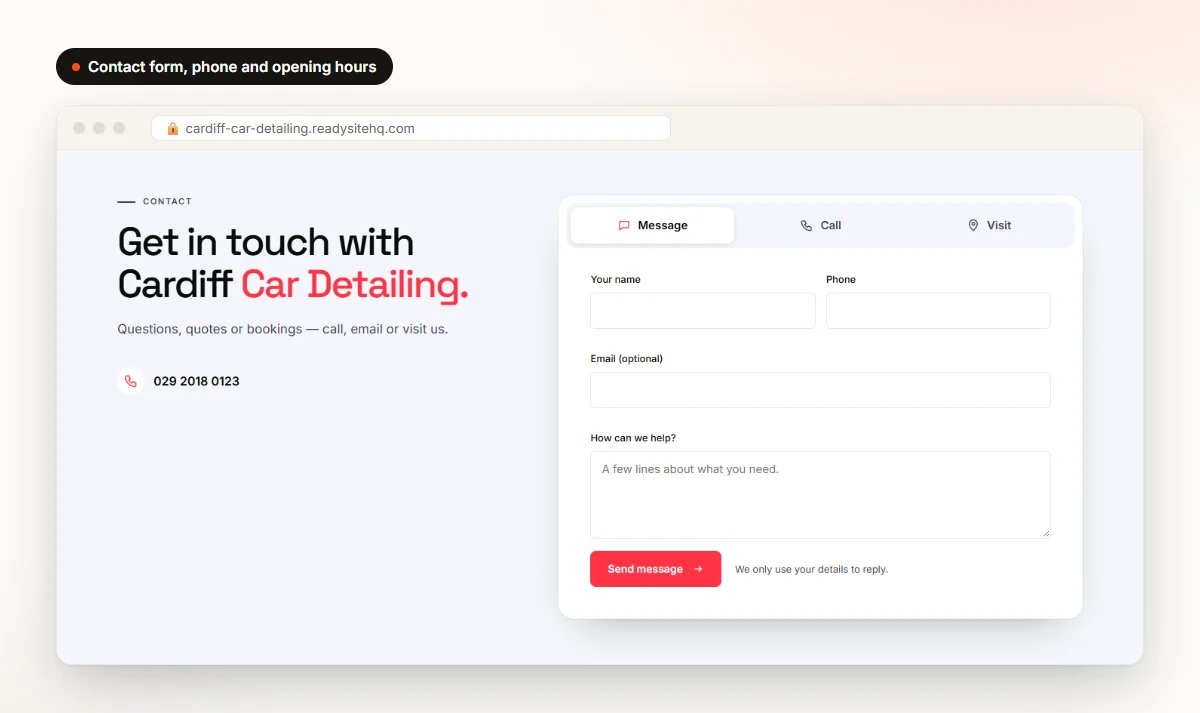
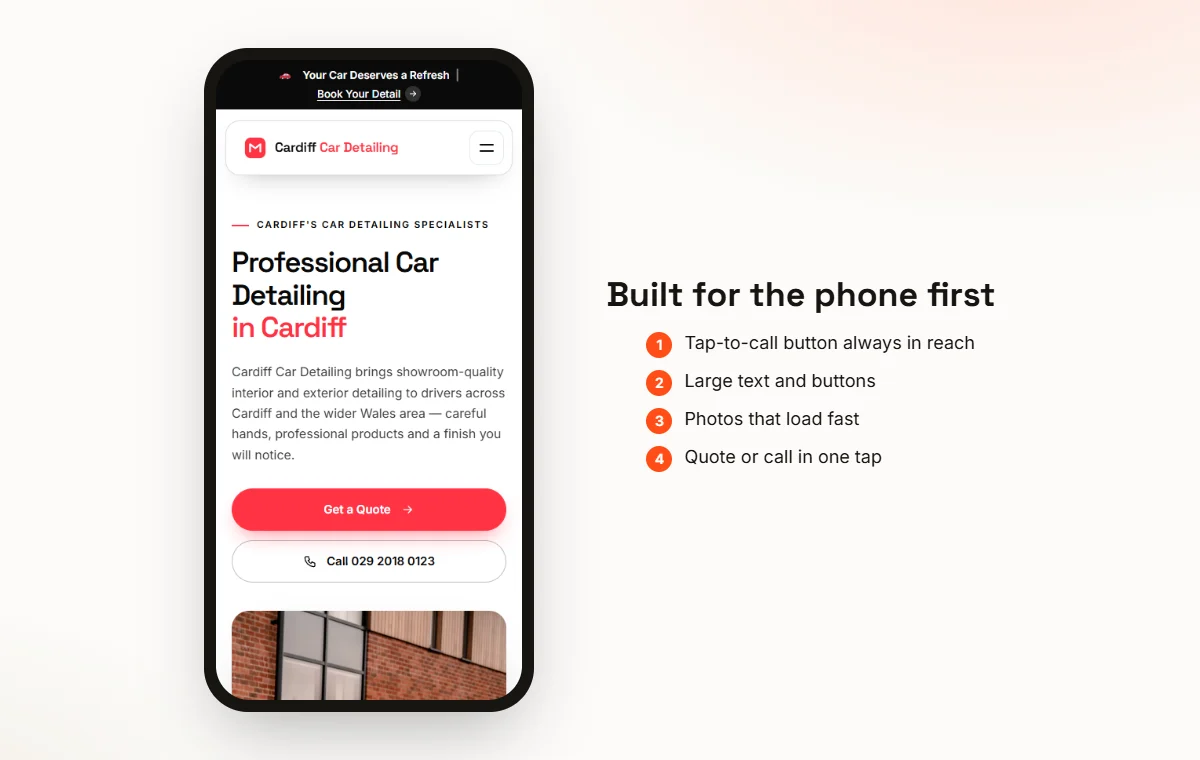
An FAQ answers the questions people would otherwise phone you about: where you’re based, how long a detail takes, whether you remove pet hair and how to book. Finish with a short form, your phone number and opening hours, and keep the number visible and tappable. Most people search for a detailer on their phone, so the layout should feel natural on a small screen, with a call button always in reach. Google explains how it looks at mobile usability in its guide to page experience.
Put together, these sections give a visitor everything they need to decide and book without calling first to ask basic questions. When you compare options, check that each one has all of them built in rather than bolted on later. Our posts on the best detailing websites and car detailing website design show more layouts and explain why each section matters.
How Do You Choose The Right Detailing Website Template?
There are lots of templates out there, and many of them look similar in a screenshot. Before you pick a detailing website template, test it against a few practical questions. Each one takes a minute to check, and together they save you from a site that looks nice in a demo but is hard to run day to day.
Built For Detailing And Easy On A Phone
First, check that the template is actually made for detailing. It should already have packages, a gallery and a service area, not just generic “About” and “Services” pages that you have to bend into shape. Then open the demo on your own phone, not just your laptop. Tap the buttons, scroll the packages and look at the photos. If you have to pinch and zoom to read anything, or the call button is hard to find, move on to the next option.
Editable Without Code And Quick To Set Up
You should be able to change text, prices and photos by clicking on them. If changing a price means opening a settings panel three menus deep, or worse, editing code, you’ll put off updates and your site will drift out of date. Setup speed matters too. The best car detailing website template fills in your details for you instead of leaving dozens of placeholder boxes. A first version you can review in minutes is far more likely to get finished than one that needs a free weekend.
A Distinct Design, Your Own Domain And A Clear Price
If hundreds of detailers use the same design, your site blends in, so look for a website template that varies the design for each business. Check whether you can connect your own domain later; starting on a free address is fine, but you’ll want your own name as you grow. Finally, look closely at the price. Watch out for website template offers that are cheap to buy but need paid plugins, hosting and a developer to finish, because those costs add up fast.
What We Found When We Tested 30 Templates
We measured all 30 ReadySite one-page templates on October 28, 2026, using phone emulation, a slowed processor and a throttled mobile connection. The median page weighed 349 KB and loaded 11 files, the main content appeared in 1.8 seconds at the median and 3.0 seconds at worst, and none of the 30 pages shifted its layout while loading. 26 of the 30 showed a call link on the first screen. These were static files on our local copy, so treat the numbers as a fair comparison between designs, not a promise of live speed.

A template that passes all of these checks will serve you for years, not just for launch day. If one fails two or three of them, it’s usually cheaper in time and money to keep looking than to work around the gaps.
How To Set Up And Personalize Your Template
With ReadySite you don’t download a car detailing website template and fill it in. You answer a few questions and the site is built around your business. After that, a handful of simple changes turn it into a website that feels like yours rather than a demo with your name on it.
Build The First Version In Minutes
Go to Build your site; you don’t need an account to start. Choose car detailing as your industry, then add your business name, phone number and town. If you already have a website, paste the link and the builder fills in what it can. The most common detailing services are already ticked, so tap to add or remove any. Add your logo and brand color if you have them, pick a style and press Build my site. If you like the result, create a free account to save it.
Swap In Your Own Photos And Prices
Replace the sample photos with pictures of cars you’ve actually detailed. Take them in good daylight, from the same angles each time, and include before and after shots; even phone photos work well if they’re sharp and well lit. Then put in the packages you really sell and what each includes. A “from” price is fine if every car is different. What matters is that customers get a rough idea of cost before they call, so the calls you get are from people ready to book.
Show Only Real Reviews
Never use fake reviews. Copy real reviews from your Google Business Profile, or ask customers you’ve served to leave one, with no incentives and without only asking the people you expect to be happy. If you haven’t set up a profile yet, Google’s Business Profile help center explains how. Until you have reviews, ReadySite keeps sample reviews and ratings hidden from your visitors, so nothing made up ever appears on your live site.
Write Like You Talk And Let The Design Differ
Change the headings and short descriptions so they sound like you. Mention your town, the cars you enjoy working on and what makes your service different. Plain, friendly words beat clever marketing lines. One common worry is that your car detailing website will look exactly like a competitor’s. ReadySite gives each new site a different mix of section designs, so two detailers in the same town don’t end up with the same layout, and you can change the design of any section yourself in the editor.
These steps take an afternoon at most, and they make the biggest difference between a site that looks generic and one that feels like a real local business. For a longer walkthrough with more tips, see our guide to building a free car detailing website.
Mistakes To Avoid With A Car Detailing Website Template
Most problems with a new car detailing website have nothing to do with the website template itself. They come from small things left undone at launch. The good news is that each one is quick to fix, and fixing them makes your car detailing website look far more trustworthy to someone seeing it for the first time.
Placeholder Text And A Hidden Phone Number
Leftover placeholder wording or “Your City” on a live site looks careless, and customers notice. Read every section out loud before you share the link, and check the footer and the contact section too, since those are easy to skip. Then make sure your phone number is easy to find. Put it in the header, the hero and the contact section. A visitor who has to hunt for a number on a phone screen will often just tap back and call the next detailer in the search results.
Too Many Sections And Stock Photos Only
More isn’t better. If a section doesn’t help someone understand your service or book a job, switch it off. A shorter page that loads quickly and gets to the point usually works better than a long one packed with filler. Stock photos are fine for day one, but replace them with your own work quickly. Detailing is a visual trade, and customers can tell the difference between a stock image of a supercar and a real photo of a family SUV you cleaned last week.
No Prices And A Forgotten Google Profile
Customers who can’t see any prices often go to someone who shows them, even if the other detailer costs more. A starting price for each package is usually enough. The other common gap is your Google Business Profile. Add your new website link there so people who find you on Maps can see your work, your packages and your service area in one tap. It’s a two-minute job that connects the place most local customers find you with the page that explains your service.
Choosing Between A Template And A Custom Site
A template is right if you’re starting out, want to be online this week, or would rather spend money on products and equipment than a designer. For most solo and mobile detailers, it does everything a custom site would. A custom website makes sense for a larger shop with several locations, online product sales, or features like a members area. There’s also a middle path: ReadySite’s done-for-you service builds a customized version for $299 one time, and you see a free preview before you pay anything.
Avoid these mistakes and even the simplest website template will look professional. On cost, the free plan is $0 on a readysitehq.com address with the editor, click-to-call, a WhatsApp button and a quote form. Pro is $9 a month and lets you connect your own domain, which you buy separately. There are no contracts.
Conclusion
A good car detailing website template gives you the structure that helps win bookings: a clear hero, simple services and packages, real photos, a service area, an FAQ and an easy way to get in touch. Choose one that is built for detailing, works well on a phone and can be edited without code, then spend an afternoon making it yours with real photos, real prices and real reviews.
See what a finished site looks like on our Showcase or the Apex Auto Detailing sample, then build your own free car detailing website in minutes. You can start on the free plan, and upgrade only when the site is earning its keep.
Done-for-you websites
Want your website built for you?
ReadySite writes the wording, builds up to 5 pages and sets up your Google Business Profile. $299 one time, and you see a free preview before you pay.