Locksmith Website: What Customers Need to See Before They Call
What a locked-out customer looks for in the first few seconds, and how to get a locksmith website that shows it.


A website for locksmith businesses gets read in conditions most sites never face. Your visitor is standing beside a locked car in a grocery store lot with the kids getting cranky, or on a porch in socks at 9 p.m., with one thumb on a phone at 12 percent battery. They are not browsing. They are trying to decide, fast, if the name in front of them is a real person who will show up and charge what they said.
That second part is harder in your trade than in most, because consumer agencies have warned people for years about low phone quotes that jump once the van arrives. This guide covers what to put first, how to explain your pricing honestly and what proof to show, then the ways to get it done, including a locksmith website template or a free locksmith website you build yourself.
Free website builder
Build a free website for your locksmith business
Answer two questions and ReadySite writes your site and adds call, WhatsApp and quote buttons. It takes a few minutes and costs $0 to start.
Why A Website For Locksmith Businesses Has To Build Trust Fast
Few customers choose a locksmith in a calm moment, and the ones who do are often still wary. A locksmith website has to work for someone who is stressed and suspicious at once, which changes what belongs at the top of the page and what can wait further down.
Your Customer Is Reading With One Thumb
A locked-out customer will not read your story, watch a slider or close a pop-up. They will look at the top of your locksmith website for a phone number and a town they recognize, then glance down for some sign that you are real. It may be dark or raining, and they may be holding groceries. So picture your page at arm’s length on a small screen. Large type, short lines and one obvious button matter more here than any design flourish. Anything that sits between them and the call is working against you and against them.
Customers Have Been Warned About This Trade
The Better Business Bureau describes a common scam where the person on the phone offers a quote as low as $15, and it tells customers to use someone else if the on-site price does not match. The Washington Attorney General’s office warns about companies that answer with a generic phrase like “locksmith” and about fake locksmiths in unmarked vehicles. The FTC cautioned back in 2008 that some locksmiths advertising in the local phone book may not be local at all.
You did not create this problem, but you inherit it on every call. For an honest shop, there is a useful side to it. Those warnings work as a list of what careful customers have been told to look for, and nearly everything on that list can go on your locksmith website. The graphic below turns that advice into plain answers you can give before anyone has to ask.

Not Every Caller Is Locked Out
Your page also serves calmer people: someone who just bought a house and wants it rekeyed, a landlord changing locks between tenants, or a shop owner who needs a new deadbolt or a master key setup. They have time to compare, so they read further down. That is why the top of a locksmith website should serve the emergency and the middle should serve the planned work. A person stranded by the roadside faces much the same rush as your lockout caller, and the mobile mechanic guide looks at that from another trade’s side.
Done-for-you websites
Want your website built for you?
ReadySite writes the wording, builds up to 5 pages and sets up your Google Business Profile. $299 one time, and you see a free preview before you pay.
Key Things A Locksmith Website Must Show First
The first screen and the one right after it carry most of the weight. These four items tell a nervous stranger who you are, where you work and when you pick up. Get them right before you spend a minute on colors, and write them the way you would say them on the phone.
Put The Phone Number Before Everything Else
On a locksmith website, the number goes at the very top, large enough to read at arm’s length, and it should dial when tapped. Also write it out in plain digits, so someone can read it to a spouse or save it for later. A call bar that stays on screen while they scroll keeps it within reach. Then plan for the calls you miss, because you cannot answer with both hands in a door. A line such as “On a job? Text your location and I’ll call you back” gives people another way in, and it tells them what to expect from you.
Use Your Real Business Name Everywhere
Washington’s advice to consumers is to ask for the legal name of the business and to call someone else if the person will not give it. So make that an easy test to pass. Put the same name on your locksmith website, your van and your invoices, and answer the phone with it every time. Add your own first name and a photo of you beside your vehicle if you are comfortable with that. A line like “Look for the white van with Ridgeway Lock on the door” is a small comfort to someone waiting alone in a dark parking lot.
Show The Area You Really Cover
Name the towns you actually reach and leave out the ones you do not. A locksmith website listing forty cities across two counties looks a lot like the out-of-town operators people are warned about. If you work from home or a van, say so plainly and show a service area. Do not rent a mailbox to look local. Google’s Business Profile rules call for your real-world location, say P.O. boxes and remote mailboxes are not acceptable, and tell service-area businesses to hide their address. When they call, give an honest estimate of how far out you are.
Say When You Really Answer
Put “24/7” on a locksmith website only if you truly pick up at 3 a.m. on a Tuesday. Someone who gets voicemail at 2 a.m. after reading that promise has a bad night and a good reason to leave a bad review, and the claim makes your other claims harder to believe. Real hours work fine: “Calls answered 7 a.m. to 10 p.m., lockouts until midnight.” A later cutoff or limited weekend hours can still win trust when you state them clearly, and a caller outside those hours can text and move on without wasting time.

A customer should be able to get through all of this in a quick glance. If you hand your phone to a friend and they can find your number, your name, your towns and your hours without scrolling far, the top of your website for locksmith customers is doing its job.
How To Explain Locksmith Pricing Without Bait Prices
Pricing is where this trade’s reputation gets decided. You cannot always give an exact total before seeing the lock, and customers know that. What they want is proof that the number will not change for no reason. A website for locksmith owners can show that long before anybody picks up the phone.
Drop The Too-Good Starting Price
A big “$19 service call” on a locksmith website may draw a click, but it also looks like the very thing people have been warned about. And if the real bill is many times that, you will have the argument in the driveway at the worst possible moment. If a number on your page is not close to what a typical customer pays for that job, take it down. A competitor may advertise lower, and you may lose a shopper to them. That is a fair trade for not spending your evenings defending a bill. Pricing and advertising rules vary, so check what applies in your state.
Explain What Goes Into The Price
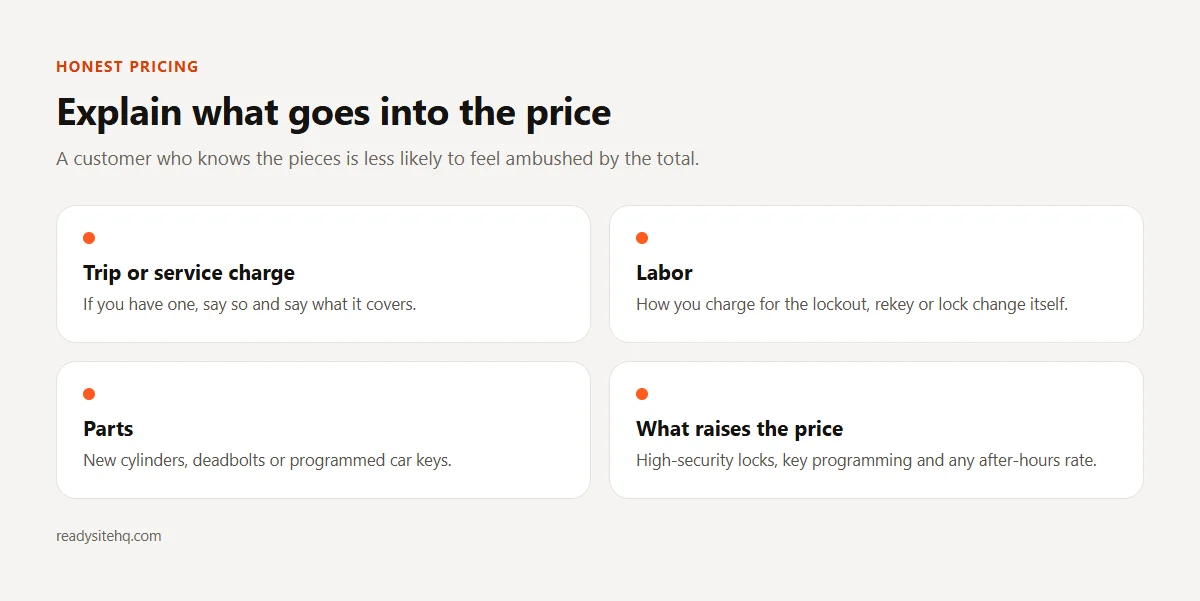
The BBB tells customers to ask about the cost of a service call, mileage and parts before agreeing to any work. Answer that on your locksmith website. Explain in one or two lines how your total comes together: a trip charge if you have one, labor for the job, parts like a new cylinder or a programmed key, and any after-hours rate. Then point out what pushes the price up, such as a high-security lock or a car key that needs programming. A customer who already understands those pieces is far less likely to feel ambushed when you give them a total.
Give Real Ranges Or Say How You Quote
If you are comfortable publishing a range for common work, such as a daytime house lockout or rekeying a set of locks, make it one that most of your actual jobs fall inside. A range so wide it covers everything tells nobody anything. If you would rather not publish numbers, describe your process: “Tell me the lock or the car and where you are, and I’ll give you a total on the phone before I drive out.” That sentence is free to write, and it is a promise a bait-price operator would be unlikely to make.
Say What Happens At The Door
A website for locksmith customers should spell out the moment they fear most. Washington’s guidance is to get an estimate for all work and replacement parts before work begins, so you could write: “I confirm the total before I touch the lock. If it differs from what I said on the phone, I’ll explain why and you can say no.” Only write that if you will stick to it. If you try to pick a lock before drilling, say so, as long as it is true. If you ask for proof that the home or car is theirs, mention it up front, since that reads as care.
None of this needs fancy wording. A clear pricing section on your locksmith website is a handful of plain sentences you probably say on the phone already. Writing them down lets a nervous stranger hear them before they have to decide whether to call you.
How To Get A Website For Locksmith Businesses
You do not need a big project for this. There are a few sensible routes, and they differ mainly in how much you want to do yourself. Whichever you pick, the wording advice above still applies, because any design can only show the facts you give it.
Start With A Locksmith Website Template
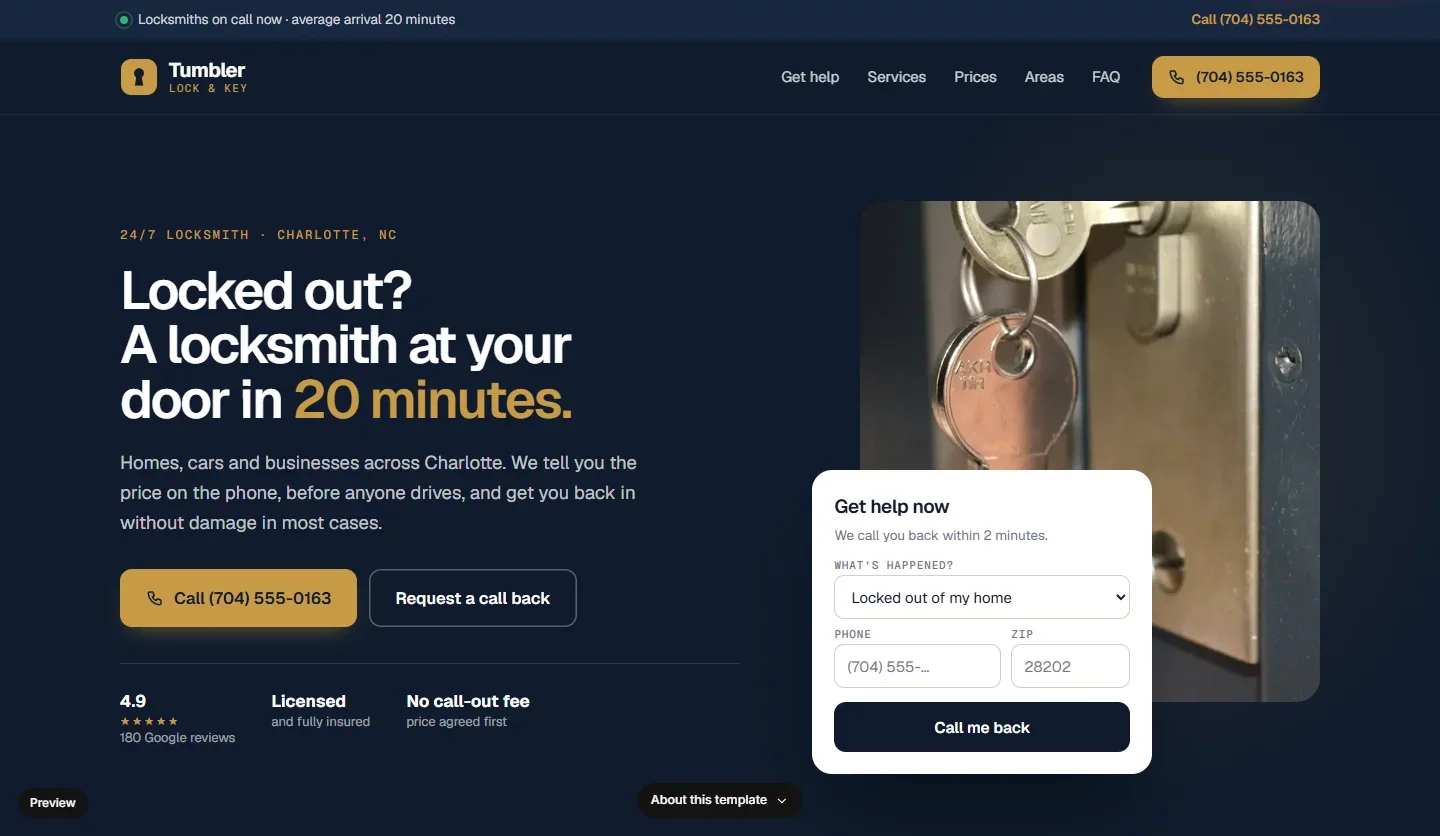
ReadySite has 10 locksmith designs ready to go, including Tumbler and Beacon. Pick one and ReadySite customizes it and sets it up on your domain for $29, with optional help from a developer on the $9 a month Pro plan. The screenshot below shows Tumbler, and the business in it is an example with a made-up name. Some of these designs lean on round-the-clock service: Beacon is made for 24/7 locksmiths and Tumbler has a 24/7 alert strip. If you pick a locksmith website template like that and do not work those hours, have that wording changed, along with any other hours or response line that does not match how you really work.
Build A Free Locksmith Website Yourself
The free builder asks your business name and what you do and where. In a few minutes it writes the wording, picks stock photos and builds a one-page site with services, a service area, a FAQ, a call bar on phones and click-to-call, WhatsApp and a quote form. It only uses facts you gave it, so it will not claim you are licensed, insured or open 24/7 unless you say so. That matters here. Then use the visual editor to add your pricing lines, your hours and a real photo of your van. A free locksmith website costs $0 to start on a readysitehq.com address.
Add Proof Before You Share Your Locksmith Website
Locksmith licensing varies by state, so check what applies to you with your state and local offices. The SBA is a good starting point on how those requirements work. If you hold a license, show the number. If you are insured or bonded, say so; if not, leave it out. Sample reviews on a new site are placeholders, so replace them with real ones or remove them. Never buy reviews, offer discounts for them or ask only your happy customers. The FTC warns that skewed review requests can mislead people.
Know When Another Option Suits Better
A one-page locksmith website suits a solo owner working a few towns. If you also sell safes, commercial access control and automotive keys, each may deserve its own page. The done-for-you option is $299 one time for up to 5 pages, with the wording written and your Google Business Profile set up. Pro at $9 a month moves your site to your own domain, which you buy separately, and a local name on a van is easier to remember than a shared address. A larger shop with several vans may be better served by a web designer. Our comparison of a website builder and a web designer can help.

Start with whichever route you will finish this week. A plain locksmith website that is live and honest can help a customer tonight, while an elaborate one still on your to-do list cannot help anyone.
Locksmith Website Questions
Here are a few questions locksmiths tend to ask before they put a locksmith website up.
Do I Have To Show My Home Address On My Locksmith Website?
No. If customers do not come to you, show your service area and your real business name instead. Be plain about it, for example “mobile service from our van across these towns.” What you should not do is list an address you do not really work from, because a customer who checks it and finds nothing there will trust you less for it.
Do I Need A Locksmith Website If I Already Have A Google Listing?
A good profile can do a lot on its own, and you should keep it current. A website gives you room for what a listing cannot fully carry, like how your pricing works and what happens at the door. Our guide to a Google Business Profile website explains how the two fit together, and it is worth reading before you decide.
Is It Really Free?
The Free plan is $0. It includes one page on a readysitehq.com address, the editor, call, WhatsApp and quote buttons, an inquiries inbox and a dashboard. If you would rather have it built for you, the done-for-you option is $299 one time, and you can see a free preview first, before you pay anything. Your own domain needs the $9 a month Pro plan.
Conclusion
A website for locksmith businesses has one main job: helping a stressed stranger decide you are real before they tap the number. Lead with the phone number, use your real name, name the towns you reach, state your real hours and explain how a price comes together. That is mostly a matter of writing down what an honest locksmith already does.
The same advice holds for any tool you use, whether that is ReadySite, another builder or a designer. A handyman site can take its time explaining a long job list, but you do not get that luxury. Before you publish, check your local licensing rules and read the page once on your phone, as if you were the one locked out.
Free website builder
Build a free website for your locksmith business
Answer two questions and ReadySite writes your site and adds call, WhatsApp and quote buttons. It takes a few minutes and costs $0 to start.
Done-for-you websites
Want your website built for you?
ReadySite writes the wording, builds up to 5 pages and sets up your Google Business Profile. $299 one time, and you see a free preview before you pay.