AI Website Builder: How It Works and Is It Right for Your Business?
What an AI website builder actually does, where it saves time, where you still need to check its work, and how to get a good result.


An AI website builder lets you describe your business in a sentence or two and get a first draft of your website back, with the wording, photos, layout and colors already chosen. For a busy owner who has put off a website for years, that can feel like a shortcut that finally works. It can be, but only if you understand what the AI is doing and where you still need to check its work.
This guide explains in plain terms how these tools work, where they genuinely save time, and where they can go wrong. We look at the real risks, like generic wording and claims you never made, and what Google says about AI written content. Then we cover how to write a good description and finish the site so it sounds like you, not like a robot. By the end you should know whether an AI website builder fits your business.
What Does An AI Website Builder Actually Do?
There is no magic involved in an AI website. An AI website builder combines a writing tool with a set of ready made page sections. You supply the facts, the AI turns them into readable wording, and the builder places that wording into a layout. Knowing the three steps helps you spot what to check afterwards.
You Describe Your Business
Everything starts with your description. On ReadySite, you answer two questions: your business name, and “What do you do, and where?” One sentence is enough, though adding your town and phone number helps. If you are unsure what to write, example buttons for a car detailer, plumber, bakery, hair salon or dog groomer fill in a sample so you can see the format. The better your description, the better the AI website, which is why we come back to this step later in the guide.

It Writes The Wording
From your description, the AI works out what kind of business you run and writes the text for each section. That usually means a headline, a short list of services, an about section, reasons to choose you, how the process works, and answers to common questions. This is the part that saves most owners the most time, because writing about your own business is surprisingly hard. It is also the part you need to read most carefully, for reasons we explain below.
Think of the AI as a helper who has listened to you describe your business for a minute and then written a first version for you to check. It is quick and tidy, but it only knows what you told it. Anything it did not hear from you, such as how you price a job or what makes your service different, still has to come from you during the edit.
It Picks Photos, Layout And Colors
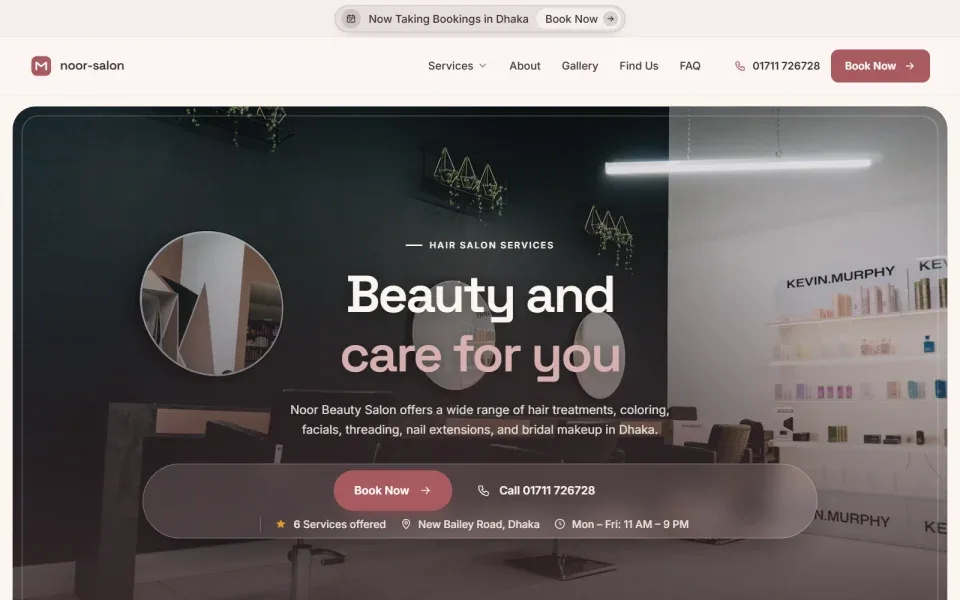
The AI website builder then chooses free stock photos that fit your trade and a color scheme that suits your industry. A beauty salon might get soft cream tones, for example, rather than the greens you might see on a landscaping site. The sections are placed in a sensible order for a local business: services near the top, reviews and your service area further down, and a contact form at the end. On ReadySite you also get click to call, a WhatsApp button and a quote form on every site.
Done-for-you websites
Want your website built for you?
ReadySite writes the wording, builds up to 5 pages and sets up your Google Business Profile. $299 one time, and you see a free preview before you pay.
Where An AI Website Builder Saves You Time
The real benefit is not that the AI writes better than you. It is that it gets you past the hardest part, which is starting. Most small business owners do not lack things to say. They lack an evening free to sit down and arrange it all with a website builder. Here is where the time savings are real, and where an AI website may not be the right fit.
No More Blank Page
Staring at an empty template is where most do it yourself websites stall. You know what you do, but turning it into a headline and five tidy service descriptions feels like homework. An AI website builder gives you something to react to. Editing a draft is much easier than writing from nothing, because you can quickly see what is wrong and fix it. Many owners find they finish in one sitting what had been on their to do list for months.
A Structure That Fits Your Trade
A good AI website builder does not just write words. It also knows which sections a local service business needs. ReadySite builds a one page site with a hero, a trust strip, services, about, why choose us, how it works, a photo gallery, reviews, your service area, an FAQ and a contact section, plus a sticky call bar on phones. Shops people visit get a map and opening hours instead of a service area. You do not have to work out the order yourself.
Quick To Change Afterwards
Because the draft arrives complete, changes are small edits rather than big rebuilds. You can rewrite a sentence, swap a photo or adjust a color in a visual editor without any coding. If you add a new service next spring, you type it in. This matters because a website is never really finished. Prices change, you expand into a new town, you collect better photos. A website builder that makes those updates easy is one you will actually keep using.
What It Costs To Try
Many AI website builder tools let you try for free, so the cost of finding out is an evening. On ReadySite, the free plan is $0 and gives you a complete AI website on a readysitehq.com address, with the editor, call, WhatsApp and quote buttons, and an enquiries inbox. Pro is $9 a month if you want your own domain, which is bought separately. If you would rather not do it yourself, the $299 done for you plan builds up to 5 pages with a free preview before you pay.
When It Is Not The Right Fit
An AI website is a strong start for a simple local site, but it is not right for everyone. If you need a large site with many custom pages, a complex booking system or a very specific brand look, a designer may suit you better. If you would rather not touch your site at all, a done for you service may fit too. Our guide on website builder vs web designer compares the options, including costs and how much of your time each takes.
For most owner run businesses, the time saved is the main reason to try one. You still do the checking, but you skip the hours of staring at an empty page.
The Real Risks Of AI Website Content
An AI website builder is good at producing text that sounds confident. That is exactly why you need to read it carefully. A sentence can sound polished and still be wrong about your business. These are the problems to look for in any AI website, whichever website builder made it.
Generic Wording That Could Fit Anyone
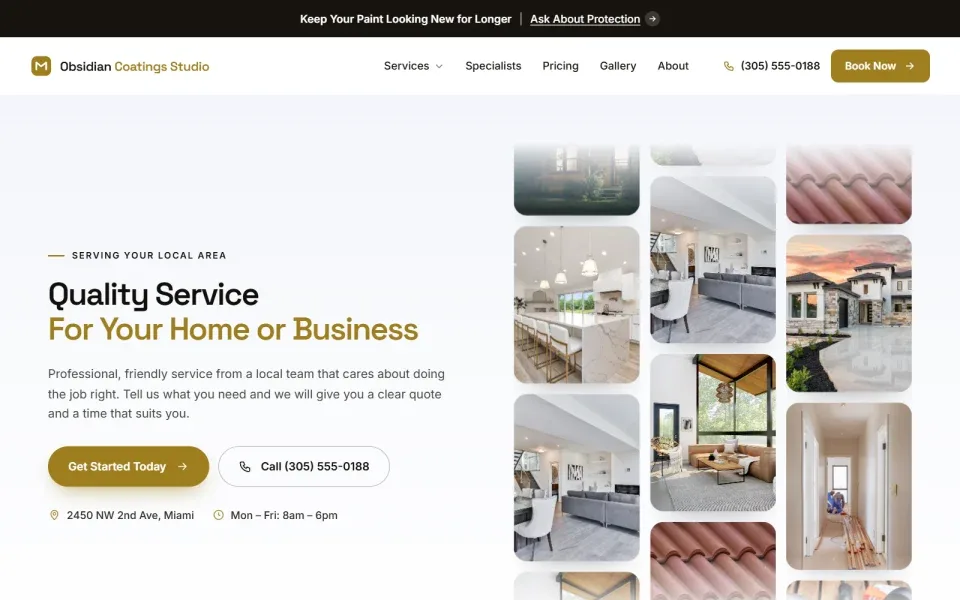
Without enough detail, AI tends to write safe, general sentences like “quality service you can trust” or “we take pride in our work”. There is nothing false about them, but they could describe any business in any town. Customers skim past them. What makes a local page persuasive is specifics: the services you actually offer, the neighborhoods you cover, how you price a job, what happens after someone calls. If your AI website reads like it could belong to a competitor, add your own details.
Invented Claims
This is the most serious risk. Some AI website tools fill gaps with claims that sound normal for your industry: “fully licensed and insured”, “15 years of experience”, “award winning”, “available 24/7”. If any of those are not true for you, publishing them misleads customers and can cause real trouble later. A customer who hires you because the site said you were insured has every reason to be upset if you are not. Read every claim on the page and delete anything you cannot back up.
Wrong Details
AI can also get small facts wrong: a phone number with a digit missing, a town you do not serve, a service you stopped offering, a price you never quoted. These are easy to miss because the sentence around them reads smoothly. Check every number, name and place name against what you know to be true. Then tap the call button on your own phone and send yourself a test message through the form, so you know customers can actually reach you.
What Google Says About AI Content
Google does not ban AI written content. Its guidance on using generative AI content says it is critical to fact check and review all AI generated content for accuracy before publishing, and warns that producing many pages without adding value for users may break its spam policies. Its page on creating helpful, reliable content makes the same point: content should be made primarily for people. For a local business, that means accurate, specific pages about real services.
None of these risks is a reason to avoid an AI website builder. They are reasons to treat the first draft as a draft. A few minutes of careful reading fixes almost all of them.
How ReadySite Keeps Its AI Writing Honest
We built ReadySite’s AI writing around the risks above, because a local business lives on trust. The aim is an AI website you can publish after a quick check, not one you have to argue with line by line. Here is how it works in practice.
Only The Facts You Gave
The ReadySite AI website builder writes only from what you tell it. If you mention that you do interior and exterior detailing in Tempe, the site talks about interior and exterior detailing in Tempe. It does not add services you did not mention or invent a phone number. If you include prices in your description, it can add a price list, but only with the prices you wrote. If you leave prices out, there is no price list, rather than a set of made up numbers that customers would hold you to.
Claims It Leaves Out
Some claims are only true for some businesses, so the AI leaves them out unless you said them. That includes “licensed”, “insured”, a number of years in business, “best in town” and “24/7”. If they are true for you, you can add them yourself in a minute. This can make the first draft feel a little more modest than a typical marketing page, and that is deliberate. It is far easier to add a true claim than to notice and remove a false one.
You Can Edit Everything
Every word, photo, color and section of your AI website can be changed afterwards in the visual editor, with no coding. Your dashboard shows a live preview of the site, its address and a “Finish your website” checklist with steps like adding your logo, using your own photos and replacing the sample reviews with real ones. If you prefer more control from the start, there is also a longer form where you choose your industry and fill in the details yourself.

What We Found When We Timed A Real Build
We tested this ourselves on October 28, 2026. On a phone-sized screen we typed a business name and one sentence into ReadySite’s two-question form and pressed Create my website, three times for three kinds of business: a mobile detailer, a plumber and a hair salon. Each finished one-page site appeared 22 to 27 seconds after the button press, with the wording written, photos chosen and the phone number placed. The tests ran on our local copy of the site, so timing on the live service can differ a little.
Two details stood out. When the description included a phone number, the site had a call button on the first screen and a call bar that stayed pinned as we scrolled. The salon description had no number, and that site had no call button at all, so always include yours. The writer also added none of the claims we had not made, such as licensed, insured or 24/7.

The result is a starting point you can trust and then make your own. You can see how finished sites look in our showcase, or open the Apex Auto Detailing example site to see a full detailing page.
How To Get A Good Result From An AI Website Builder
The quality of any AI website depends heavily on what you put in and what you do after. These five steps take about an hour in total and make the difference between a site that sounds generic and one that sounds like a real local business.
Write A Better Description
Include four things: the services you offer, the town or area you serve, who your customers are, and your phone number. Compare “car detailing” with “Mobile car detailing in Mesa and Gilbert for busy families and small fleets, interior deep cleans, exterior wash and wax, call 480 555 0123.” The second gives the AI real material, so the headline, services and FAQ come out specific. You can try it now and build your site from a single sentence like that.

Read Every Line Out Loud
Once the draft is ready, read it aloud as if you were telling a customer about your business. Anything that sounds stiff, vague or untrue, change it. Swap general phrases for your own way of saying things. If customers always ask the same question on the phone, make sure the FAQ answers it in your words. For more help with wording, our guide to detailing website copy shows how to write services and headlines that sound like a real person.
Replace Stock Photos With Your Own
Stock photos are there so your AI website looks complete on day one. Over time, replace them with pictures of your real work, your van, your team or your shop. Customers want to see who will turn up and what the result looks like. Phone photos are fine if they are well lit and in focus. Start with the photos at the top of the page and in the gallery, because those are the ones visitors notice first.
Add Real Reviews
A new site often comes with sample reviews as placeholders. Replace them with real reviews from real customers as soon as you can, and remove any samples you have not replaced. Never buy reviews, write fake ones or offer discounts in exchange for them. Ask happy customers in person or with a short text after the job, and copy their words exactly as they wrote them. A few genuine reviews are worth far more than a page of polished ones.
Keep Your AI Website Up To Date
An AI website builder gets you live quickly, but keeping the site accurate is still your job. Set a reminder every month or two to check your prices, hours, services and service area. Add a recent photo of your work while you are there. If you change your phone number or move into a new town, update the site the same day. An out of date page costs you trust, however well it was written at the start, and quick edits are exactly what the visual editor is for.
Do these things and the AI’s draft becomes your website. The tool saves you the setup time, and you supply the details only you know.
Conclusion
An AI website builder is a practical way to get a local business online without starting from a blank page. It writes the wording, chooses photos, colors and a layout, and gives you a complete draft in a few minutes. The tradeoff is that you must check its work. Watch for generic wording, claims you never made and wrong details, and follow Google’s advice to review everything for accuracy before you publish.
Give it a clear description, read every line, add your own photos and real reviews, and you will have a site that sounds like your business. If you want to see what an AI website builder makes for your trade, get a free preview, or read our guide to a free website builder with no coding to compare other ways of building without code.
Done-for-you websites
Want your website built for you?
ReadySite writes the wording, builds up to 5 pages and sets up your Google Business Profile. $299 one time, and you see a free preview before you pay.