Detailing Quote Form: The Fields to Ask, the Ones to Skip, and What Happens After Send
Which fields a detailing quote form needs, how to ask for photos, how to cut friction, what your auto-reply should say, and how to keep spam out without blocking real customers.


A good detailing quote form asks for just enough to give a price: who the customer is and how to reach them, what vehicle, which service, where it is, and optionally the condition with a few photos and preferred days. Keep four or five fields required, make the rest optional, send an instant confirmation that says when you’ll reply, and stop spam with invisible checks rather than puzzles. That combination gets more forms finished and fewer “how much for my car?” messages with nothing to go on.
This guide covers the fields worth asking for and the wording for each, how to ask for photos so people actually send them, ways to cut friction on a phone, an auto-reply template, and practical spam protection. It’s about the form itself. For what to put in the quote you send back, see our detailing quote template.
If you don’t have a site yet, make your car detailing website free: type your business name and services, and ReadySite writes the page for you.
Why Your Site Needs A Detailing Quote Form
Many customers will call or text you, and you should make that easy. But a detailing quote form does a few things a phone call can’t. It collects the same information every time, so you’re not chasing basic details over five back and forth texts, and it gives you what you need to price the job on the first reply.
It Works When You Can’t Answer
A quote form works at 11 pm when you’re asleep, and at 2 pm when you’re elbow deep in an interior with wet hands. It also suits people who don’t want to talk on the phone, which is a bigger group than many owners expect. Some customers will happily fill in six fields but would never call a stranger to ask a price. Without a quote form, those people simply move on to the next detailer in the search results, and you never know they were there.
It Filters Serious Leads
A well-built quote form also filters. Someone who fills in their vehicle, ZIP code and the service they want is usually a more serious lead than someone who sends “how much?” with no context. You still reply to both, but the detailing quote form lets you answer the serious one with a real price straight away. Over a busy week, that adds up to less time typing the same questions and more time spent on jobs that actually book.
Put It Where People Decide
Put the enquiry form where people make up their minds: near the top of your services or pricing page, at the end of your homepage, and linked from every “Get a quote” button. On a phone, a short form directly on the page usually beats a link to a separate page, because every extra tap is a chance to lose someone. Keep click-to-call and text options next to it, so visitors can choose whichever way feels easiest to them in the moment.
Done-for-you websites
Want your website built for you?
ReadySite writes the wording, builds up to 5 pages and sets up your Google Business Profile. $299 one time, and you see a free preview before you pay.
Which Fields Does A Detailing Quote Form Need?
Every extra field costs you some completions. The W3C’s forms tutorial advises asking only for the information needed to complete the task, because irrelevant or excessive requests make people give up. Here’s what a detailer genuinely needs on a quote form, split into required and optional, with wording you can copy straight into your own enquiry form.
Required Fields For A Usable Lead
Ask for one “Your name” field, since splitting first and last name adds a field for no benefit. Ask for a mobile number labeled “Mobile number (we’ll text your quote)” so people know why you want it. For the vehicle, one free-text field like “e.g. 2021 Toyota RAV4” is easier on a phone than three dropdowns. For the service, use options that match your menu exactly, plus “Not sure, please advise.” Mobile detailers should also ask for a ZIP code, not the full address, until the customer books.
Optional Fields That Sharpen The Price
Email is useful for a written quote and confirmation, so label it “Email (for your confirmation)” and keep it optional unless your auto-reply depends on it. A “best way to reach you” choice of text, call or email shows you respect their preference. Condition checkboxes cover what changes your price: pet hair, stains, smoke or odor, heavy mud or sand. Preferred days can be as simple as weekday or weekend, morning or afternoon. Finish with an optional “Anything else we should know?” box for gate codes or parking.
That’s the whole detailing quote form: four or five required fields, a handful of optional ones, and about two minutes to complete on a phone. If you can’t explain why you need a field, remove it. A shorter quote form that people actually finish gives you more to work with than a long one that most visitors abandon halfway, even if each finished enquiry carries a little less detail.
How To Ask For Condition Photos
Photos are the single best way to quote accurately without seeing the car, but an unexplained “Upload photos” field often gets skipped. Use the label to explain the benefit and list the shots. Example wording: “Photos (optional, but they help us give an exact price): front seats, back seats, floor or trunk, and any problem areas outside. Phone photos are fine.” Keep photos optional, because requiring them stops people who are at work or whose car is in the garage. They can text photos later.
Add one privacy line: “Please avoid photos showing documents or personal items. We use photos only to prepare your quote.” If you’d like to use any photos in marketing later, ask separately, after the job. Our guide to before and after detailing photos covers asking permission. Then mention photos once more in your auto-reply, because many people only find the time to take them after they’ve sent the detailing quote form.
Extra Fields For Bigger Jobs
If you sell coatings, fleet work or memberships, a few optional fields save a round of questions. For coatings, ask whether the car is new or used, whether it’s been polished or coated before, and where it’s parked. Our ceramic coating pricing guide explains how those affect the quote. For fleets, ask for the company name, number and type of vehicles, and how often they want service. For detailing membership plans, ask how often they’d like visits and when the car last had a full detail.
You can show these extra fields only when someone picks that service, or put a separate quote form on that service’s page. Either way, the core detailing quote form stays short for everyone else, and the customers with bigger jobs still give you what you need to quote them properly on the first reply.

What We Found When We Checked Real Forms
We checked the contact form on the three sites ReadySite built in our test on October 28, 2026. Each one asked for four things: name, phone, email and a message box labeled How can we help?, plus a hidden spam trap that people never see. Four fields is a sensible starting point for most local businesses. Add a question such as vehicle size or service only when you really use the answer to prepare your quote.
How To Reduce Friction On Your Quote Form
Friction is anything that makes people hesitate, retype or give up. Most of it comes from small details that you only notice when you fill in the form yourself, on a phone, with one hand. Fixing them takes minutes and usually means more finished forms from the same number of visitors. You don’t need more traffic to get more enquiries if your quote form stops losing the people who already started it.
Visible Labels And The Right Keyboard
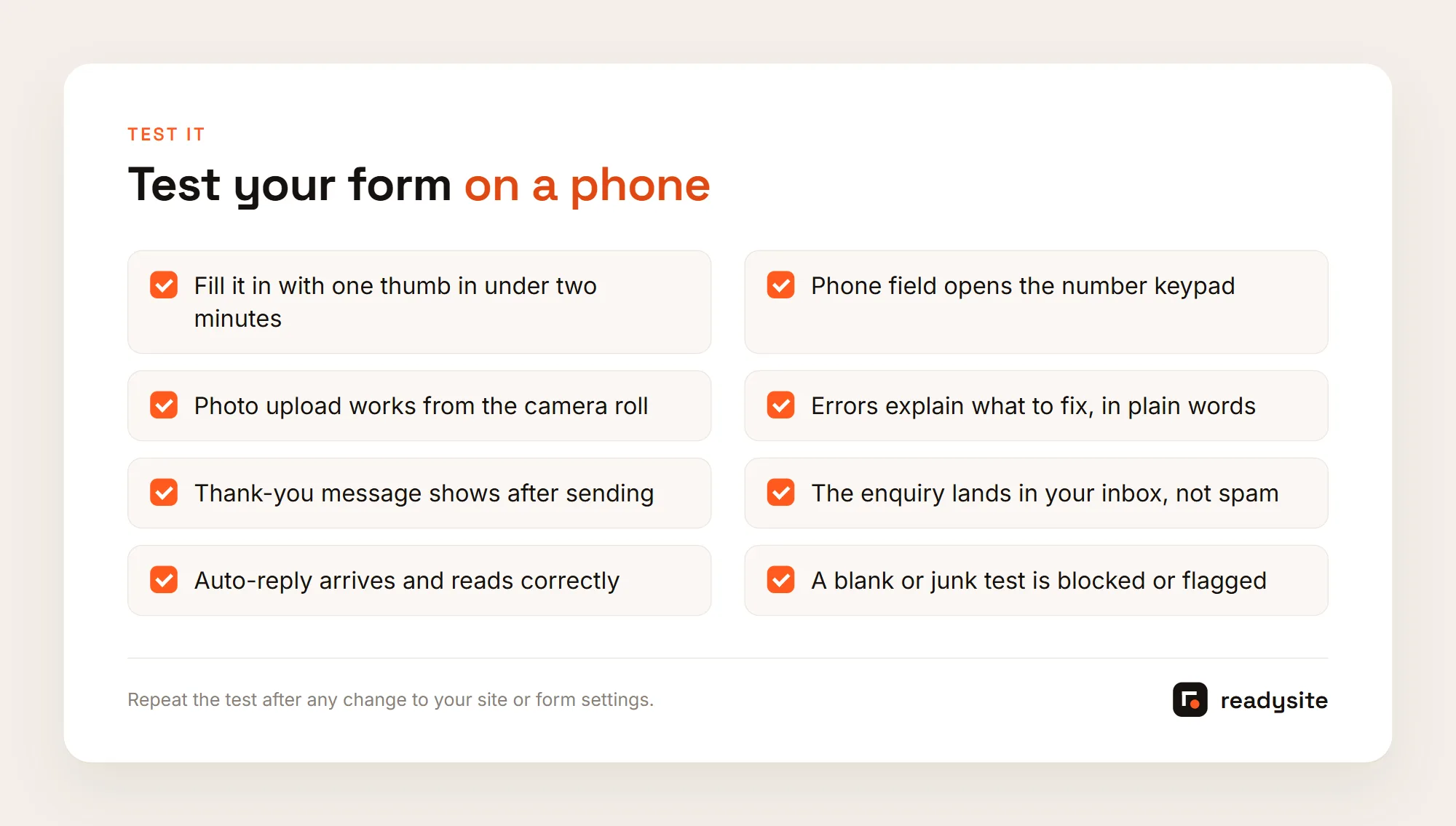
Put labels above fields, not only as gray placeholder text that disappears when someone starts typing. People forget what a field was for halfway through, especially on a small screen. Set the phone field so it opens the number pad, and the email field so it shows the @ key. Write “(optional)” after optional fields so people don’t assume everything is required. The W3C tutorial linked above covers labels, grouping and error messages in more depth, which makes your enquiry form easier for everyone, including screen reader users.
Clear Errors And A Useful Button
When something goes wrong, say how to fix it. “Please add a mobile number so we can text your quote” beats “Invalid input.” Name the button after what happens next, like “Get my quote” or “Send for a price,” instead of “Submit.” Then add one line of reassurance beside it: “No spam. We reply within [time] during working hours.” That small line answers the two worries most people have at the moment they press the button, and it costs you nothing to add.
Single Page Or Multi-Step
For four to nine short fields, a single page is usually fine. If your enquiry form grows longer, for example for fleet or coating enquiries, splitting it into two or three steps with a progress indicator can feel lighter. Put the easy fields like vehicle and service first, and contact details last, once people have invested a little effort. Whichever layout you choose, test it on a phone, because a layout that feels short on a laptop can feel endless on a small screen.
Copy Around The Form
Give the quote form a heading that says what it does, like “Get a price for your car,” and one line explaining what happens next. Visitors want to know whether they’ll get a call, a text or an email, and roughly when. Our guide to detailing website copy has templates for that wording and for the rest of the page. Keep the copy short and specific. A friendly sentence that names your service area also reassures people that you actually cover their street.
None of these changes need a developer. Fill in your own quote form once a month as if you were a customer, on mobile data rather than home Wi-Fi, and fix whatever made you pause. Small fixes to an enquiry form add up, and the people who would have quietly given up become customers you can reply to.
What Happens After A Customer Presses Send
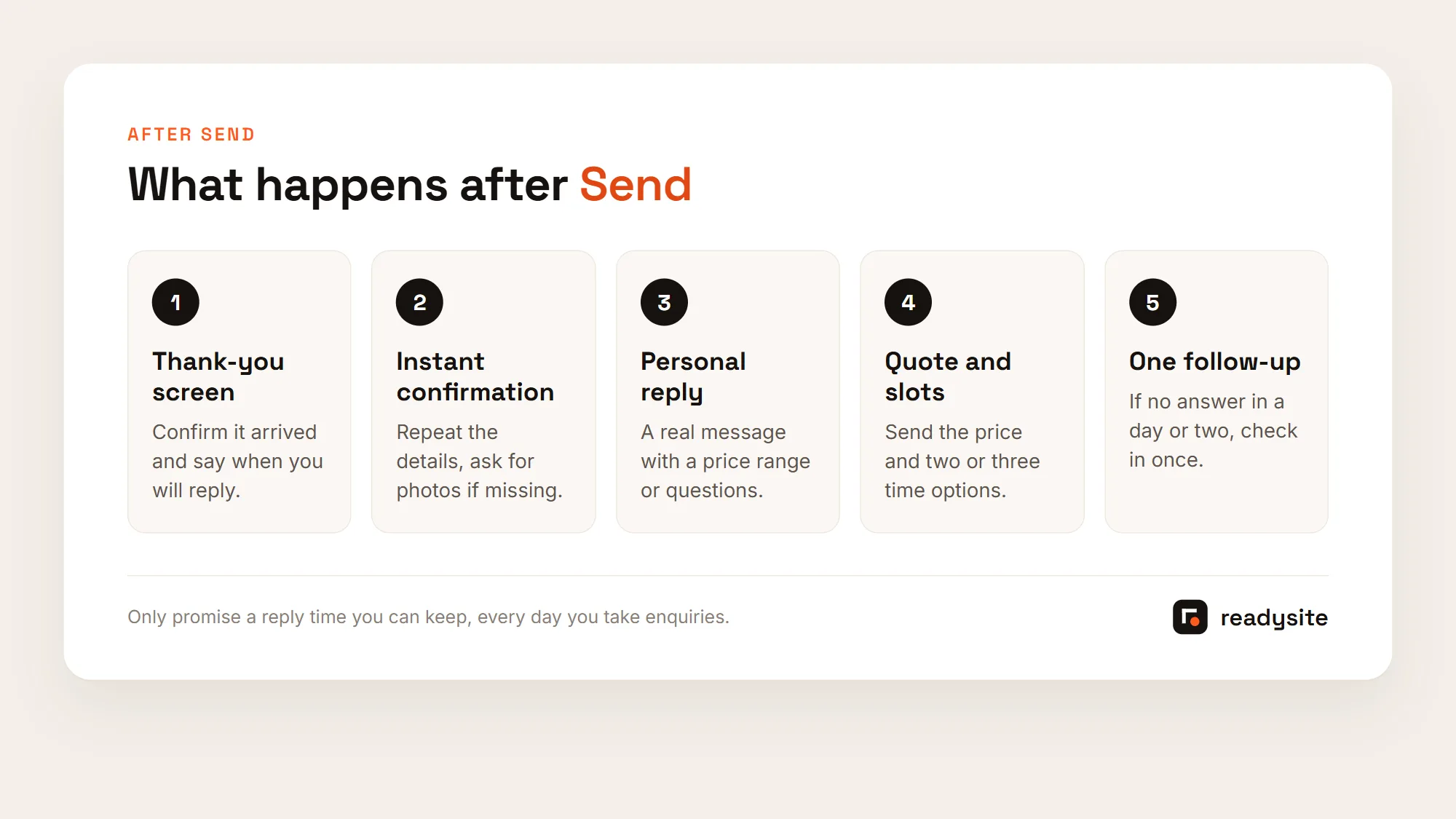
The moment after someone presses send is when they’re most likely to wonder if it worked. A clear thank-you screen and an instant confirmation answer that question, and they buy you time to write a personal reply. The form is only half the job. What follows it decides whether the enquiry becomes a booking.
A Thank-You Screen That Reassures
Show a message on screen as soon as the quote form is sent, so nobody presses the button twice or calls to ask if it worked. Template: “Thanks, [name]! We’ve got your request for your [vehicle]. We’ll text you a price within [time] during working hours. If you didn’t add photos, you can text them to [number] to speed things up.” Replace the brackets with your own details, and only promise a reply time you can actually keep on a busy day.
An Auto-Reply That Stays About The Enquiry
Template: “Hi [name], thanks for your detailing quote request. Here’s what you sent: [service], [vehicle], [ZIP]. We’ll reply with a price and two or three time options within [time]. Want an exact price? Reply with photos of the seats, floors and any problem areas. [Business name], [phone].” It repeats their details so they can spot a mistake, sets a reply time, and asks for photos without pressure.
The FTC’s CAN-SPAM compliance guide treats messages that confirm a transaction the person asked for differently from commercial messages, and the primary purpose decides which one it is. Turn the auto-reply into a promotion and it may carry extra requirements. Rules for automated texts are stricter again, so check your texting provider’s consent requirements. This is not legal advice.
Reply Personally, And Quickly
An auto-reply is a holding message, not a quote. Follow up with a real reply as soon as you can: a price or price range, any questions you still have, and two or three times you could do the job. Send form alerts to the phone you carry on jobs, not an inbox you check once a week. For full reply scripts and follow-up timing, see our guide to handling detailing leads, which picks up exactly where this form leaves off.
Set up all three steps once, and every quote form submission gets the same calm, reliable response, even on your busiest days. Customers notice that consistency, and it makes your business feel organized before you’ve even met them.
How To Keep Spam Out And Test Your Enquiry Form
Any public enquiry form will attract some spam: bots selling SEO, links to sketchy sites, gibberish. The goal is to block most of it without making real customers solve puzzles, then test the whole thing yourself before you share the link. Spam protection on a quote form should be invisible to real people. If a customer notices it, it’s probably costing you enquiries.
Honeypots And Invisible Checks
A honeypot is a hidden field that people never see but bots often fill in. If it’s filled, the submission is discarded, and many form tools offer this as a simple setting. Google’s reCAPTCHA v3 scores each request in the background without showing users a challenge, and Cloudflare Turnstile is another option that usually doesn’t ask visitors to solve a puzzle. A required ZIP code or vehicle field also filters a surprising amount of generic spam, because bots tend to get it wrong.
Don’t Block Real Customers
Visible puzzles, very strict validation and long required fields cost you genuine enquiries. Rejecting a ZIP code with a space in it, for example, turns away a real customer to stop a bot. Don’t publish a plain email address on the page. Use the form, click-to-call and a text link instead, so scrapers have less to collect. Check your spam folder weekly at first so real enquiries aren’t lost. If spam gets through occasionally, deleting it is cheaper than losing a real job.
Set It Up And Test It On Your Phone
If you use a website builder, check what its quote form includes: the fields above, a thank-you message, email notifications and some spam protection. ReadySite’s free plan includes a quote form along with click-to-call and a WhatsApp button. You can build your car detailing website free, add your services and area, and send people straight to the form. Whatever tool you use, fill in the detailing quote form on your own phone, submit it, and confirm the alert and auto-reply both arrive.
Common Mistakes To Avoid
Too many required fields give people a reason to leave your quote form. No ZIP code means wasted replies to people you can’t reach. Service names that don’t match your menu lead customers to pick the wrong package, so the quote surprises them. No confirmation means double submissions. And a form that’s never tested looks fine until you notice the enquiries stopped. Track where enquiries come from for a month: form, call, text or WhatsApp. If visits are high and form enquiries low, revisit the fields and the copy.
Most of these take minutes to fix once you know about them. For what else belongs on the page around your enquiry form, from photos and reviews to your service area, see our car detailing website design guide. If your form needs more than a few fields, a multi-step form splits it into short screens that work better on phones.

Conclusion
A detailing quote form only needs to ask for enough to give a price: name, mobile number, vehicle, service and ZIP code, with condition, photos and preferred days as optional extras. Open your current form on your phone and fill it in as a customer would. Remove any field you can’t justify, add the photo wording, write your thank-you message and auto-reply, and switch on a honeypot or invisible check. It takes about an hour, and the form works every hour of the day after that.
Prefer to have it handled? Request a free preview of a done-for-you site: for $299 one time, ReadySite builds up to five pages, writes the wording and sets up your Google Business Profile, and you pay only if you like the preview.
Done-for-you websites
Want your website built for you?
ReadySite writes the wording, builds up to 5 pages and sets up your Google Business Profile. $299 one time, and you see a free preview before you pay.